This time we’re going bigger than ever. Fabric, Power BI, SQL, AI and more. We're covering it all. You won't want to miss it.
Learn moreLevel up your Power BI skills this month - build one visual each week and tell better stories with data! Get started
Hello!
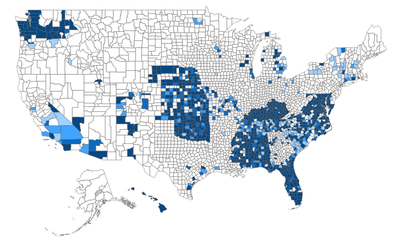
I have a US-county shape map set up with conditional color rules - based on a % score for each county, the colors range from white (0%) to dark purple (75-100%). The conditional formatting works perfectly at the national level:
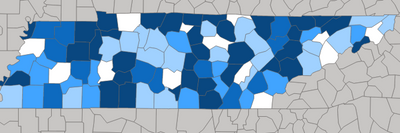
The coloring also works perfectly when auto zooming to a state with varying county-level % (this is TN):
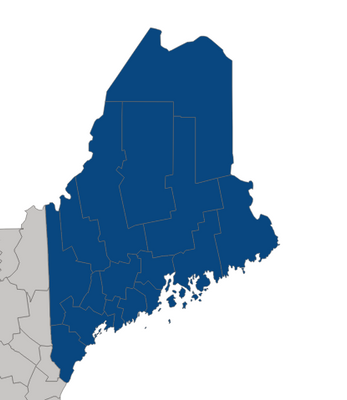
However, when zooming in on a state where all the counties score 0, instead of making the entire state white, all of the counties default to the 75-100% color (this is Maine, which as you can see properly displays as all white in the national map):
Any ideas why it does this and if there's a workaround? Thanks.
Solved! Go to Solution.
Hi @jlkturl ,
Please check the requirements for Shape map: The Shape map visual will plot up to a maximum of 1,500 data points.
For more imformation about Shape map, you can read related document: Use Shape maps in Power BI Desktop (Preview) - Power BI | Microsoft Learn
Thanks for your efforts & time in advance.
Best regards,
Community Support Team_Binbin Yu
If this post helps, then please consider Accept it as the solution to help the other members find it more quickly.
Hi @jlkturl ,
Please check the requirements for Shape map: The Shape map visual will plot up to a maximum of 1,500 data points.
For more imformation about Shape map, you can read related document: Use Shape maps in Power BI Desktop (Preview) - Power BI | Microsoft Learn
Thanks for your efforts & time in advance.
Best regards,
Community Support Team_Binbin Yu
If this post helps, then please consider Accept it as the solution to help the other members find it more quickly.
Check out the April 2026 Power BI update to learn about new features.
Sign up to receive a private message when registration opens and key events begin.
If you have recently started exploring Fabric, we'd love to hear how it's going. Your feedback can help with product improvements.
| User | Count |
|---|---|
| 30 | |
| 24 | |
| 23 | |
| 17 | |
| 16 |
| User | Count |
|---|---|
| 61 | |
| 35 | |
| 33 | |
| 23 | |
| 23 |