Don't miss your chance to take the Fabric Data Engineer (DP-600) exam for FREE! Find out how by watching the DP-600 session on-demand now through April 28th.
Learn moreJoin the FabCon + SQLCon recap series. Up next: Power BI, Real-Time Intelligence, IQ and AI, and Data Factory take center stage. All sessions are available on-demand after the live show. Register now
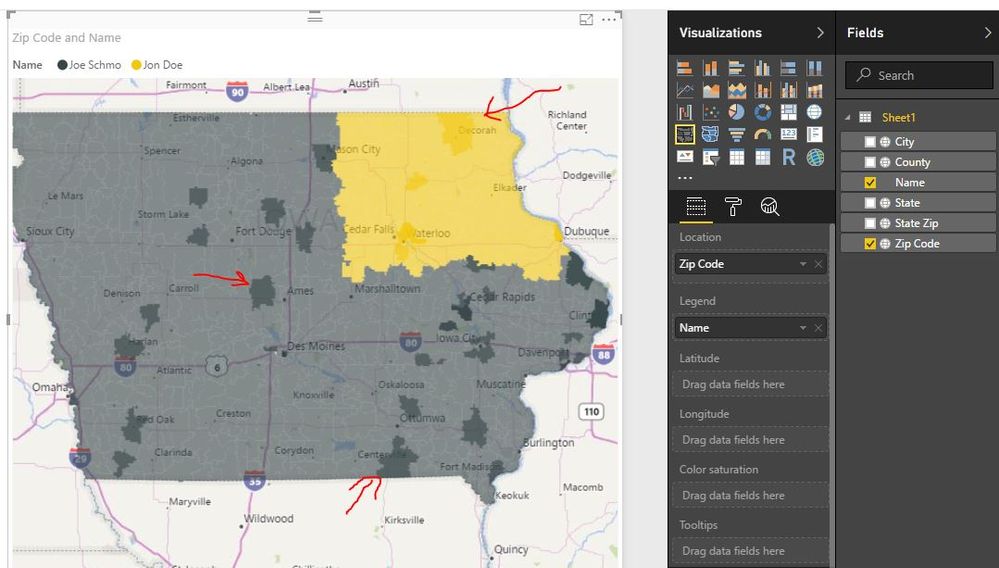
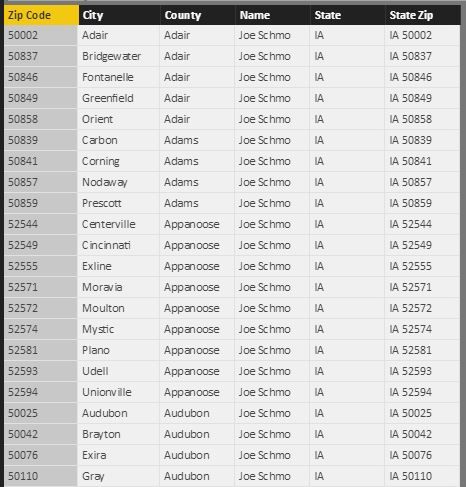
My team is trying to have a Filled Map show Salesmen Territories. Our table is very simple, and we have set the data types as correct Data Categories. However, when we pull Zip Code into the Location field, and "Name" into the legend, the filled map does color saturation. It colors ZIP codes within the same Salesman Territory different shades of the same color.
Can someone help us to understand what is going on? We would like all the ZIP codes under the same Salesmen to be the same color.
All Data types are Text, and the Data Categories are as follows:
Zip Code - Postal Code
City - City
County - County
State - State or Province
State Zip - Place
Thank you!
We figured it out--Zip Codes can overlap!
I will post our solution once we figure out a way around it.
Hi @bdymit,
Have you managed to figured the issue out? If yes, could share the solution here? ![]()
Regards
Check out the April 2026 Power BI update to learn about new features.
If you have recently started exploring Fabric, we'd love to hear how it's going. Your feedback can help with product improvements.
A new Power BI DataViz World Championship is coming this June! Don't miss out on submitting your entry.
| User | Count |
|---|---|
| 45 | |
| 38 | |
| 34 | |
| 21 | |
| 17 |
| User | Count |
|---|---|
| 66 | |
| 65 | |
| 31 | |
| 26 | |
| 26 |