Share feedback directly with Fabric product managers, participate in targeted research studies and influence the Fabric roadmap.
Sign up nowGet Fabric certified for FREE! Don't miss your chance! Learn more
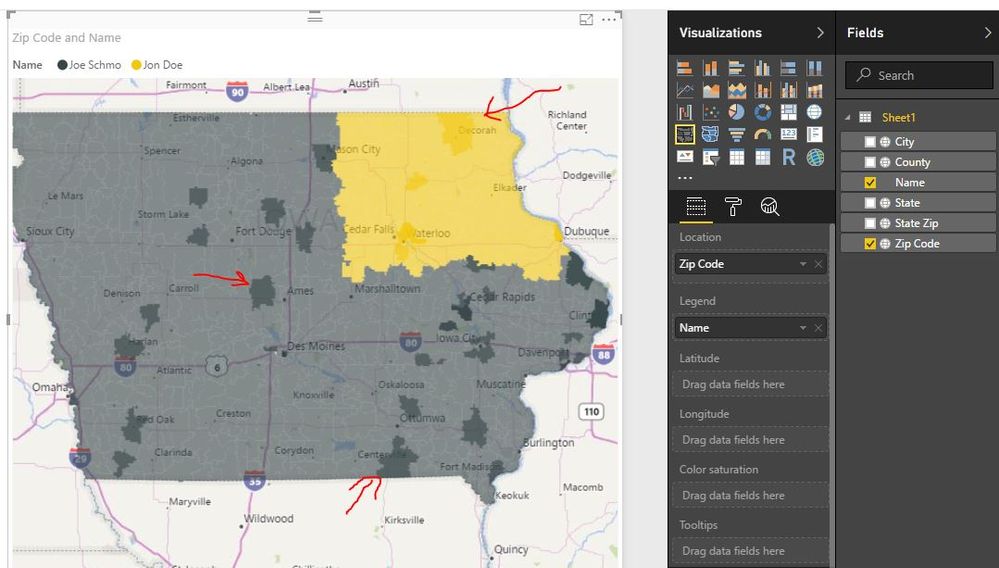
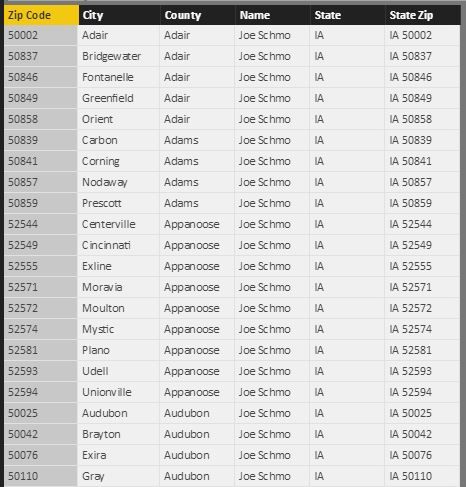
My team is trying to have a Filled Map show Salesmen Territories. Our table is very simple, and we have set the data types as correct Data Categories. However, when we pull Zip Code into the Location field, and "Name" into the legend, the filled map does color saturation. It colors ZIP codes within the same Salesman Territory different shades of the same color.
Can someone help us to understand what is going on? We would like all the ZIP codes under the same Salesmen to be the same color.
All Data types are Text, and the Data Categories are as follows:
Zip Code - Postal Code
City - City
County - County
State - State or Province
State Zip - Place
Thank you!
We figured it out--Zip Codes can overlap!
I will post our solution once we figure out a way around it.
Hi @bdymit,
Have you managed to figured the issue out? If yes, could share the solution here? ![]()
Regards
If you love stickers, then you will definitely want to check out our Community Sticker Challenge!
Check out the January 2026 Power BI update to learn about new features.
| User | Count |
|---|---|
| 65 | |
| 65 | |
| 48 | |
| 21 | |
| 18 |
| User | Count |
|---|---|
| 119 | |
| 117 | |
| 38 | |
| 36 | |
| 27 |