Get certified for free when you join Fabric Data Days 2026 and dive into Fabric, Power BI, SQL, AI, and other essential data skills.
Join nowJuly 7 - July 17 | Round 2 of the Power BI Dataviz World Championships. Don't miss your chance! Learn more
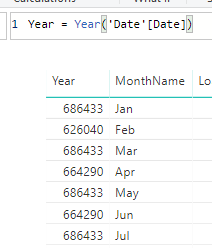
My year is coming out as a 6-digit number. I created a calendar with calendar auto and then added a year column with Year = Year('Date'[Date]). How can I make it a four digit year? It worked in a table visualization yesterday but in a new table today in the same pbix file it is coming out as a 6 digit year.
Solved! Go to Solution.
Within your visual you probably have an implicit measure so it is probably summing up all your year values. In the visual click the drop down for the field and click dont summarise. Also select the field and under the modelling tab change the default summarisation to do not summarise.
Yep - it was summarizing! I had gone back and changed the column to format as "yyyy" and that worked but your solution is easier.
Join us in Barcelona for FabCon and SQLCon, the Fabric, Power BI, SQL, and AI community event. Save €200 with code FABCMTY200.
Join Fabric Data Days 2026: 60 days of free live/on-demand sessions, challenges, study groups, and certification opportunities.
| User | Count |
|---|---|
| 23 | |
| 22 | |
| 18 | |
| 17 | |
| 13 |
| User | Count |
|---|---|
| 67 | |
| 48 | |
| 46 | |
| 41 | |
| 39 |