

Join us at FabCon Atlanta from March 16 - 20, 2026, for the ultimate Fabric, Power BI, AI and SQL community-led event. Save $200 with code FABCOMM.
Register now!The Power BI Data Visualization World Championships is back! Get ahead of the game and start preparing now! Learn more
Good afternoon
I would need your help related to a YTD calculation.
I have a table called: COMPLETE D_PEDIDO where the fields are:
-ENTRY ORDERS EUROS
-CREATION DATE
and another table M_CALENDARIO where the DAY field is (which is linked to CREATION DATE)
I have data from 2019 and 2023 and I want to compare the YTD of 2019 with the YTD of 2023 month by month.
Let's say today is 03/28/2023.
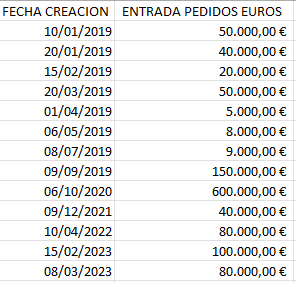
For example the table is like this (data from several years appear but I just want to compare the current year with 2019)
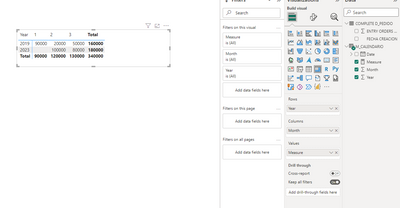
What I am looking for is to be able to obtain a result like this:
What I do NOT want is for it to come out like this:
Could you help me with a formula that would do it?
Thank you very much in advance.
Hi @Syndicate_Admin ,
I suggest you to try code as below to create a measure.
Measure =
VAR _TODAY =
TODAY ()
RETURN
CALCULATE (
SUM ( 'COMPLETE D_PEDIDO'[ENTRY ORDERS EUROS] ),
FILTER (
M_CALENDARIO,
M_CALENDARIO[Year]
IN { YEAR ( _TODAY ), 2019 }
&& M_CALENDARIO[Month] <= MONTH ( _TODAY )
)
)
Result is as below.
Best Regards,
Rico Zhou
If this post helps, then please consider Accept it as the solution to help the other members find it more quickly.
Thank you very much for the help!.
With this solution I have the entry of orders month by month, but what I needed was the accumulated calculation, could you modify the measure to obtain the same calculation but accumulated?
Thank you
The Power BI Data Visualization World Championships is back! Get ahead of the game and start preparing now!
Check out the November 2025 Power BI update to learn about new features.
| User | Count |
|---|---|
| 59 | |
| 43 | |
| 42 | |
| 23 | |
| 17 |
| User | Count |
|---|---|
| 190 | |
| 122 | |
| 96 | |
| 66 | |
| 47 |