cancel
Showing results for 
Search instead for 
Did you mean: 

The Power BI Data Visualization World Championships is back! Get ahead of the game and start preparing now! Learn more

Reply
Anonymous
Not applicable

YTD Running Total Chart

I am trying to create a chart showing the running cummulative total by day for the current fiscal year. Here is the measure I am using:


Total Proposed Project Costs YTD = TOTALYTD(
   [Total Proposed Project Costs],
   CalendarSubmitted[Date],
   CalendarSubmitted[Date]<=Today(),"6/30")

I made my chart axis CalendarSubmitted[Date], but the chart shows everything from the beginning of the fact table. I want it to just show this year by date. I don't want to have to manually change the filter on the graph every time the FY changes. How do I incorportate that into the measure? And I ultimately want to add another line with a Last YTD measure.


Screen Shot 2019-10-02 at 10.07.41 AM.pngI

4 REPLIES 4
v-juanli-msft
Community Support
Community Support

Hi @Anonymous 

Would you like to show total Ytd values for current year
(eg, this year2019, show Ytd values from 2019/1/1 to today)

Capture8.JPG

Measure = TOTALYTD([sum cost],'calendar'[Date],'calendar'[Date]<=TODAY()&&YEAR('calendar'[Date])=YEAR(TODAY()))

Or for current year 2019, show values from 2018/7/1 to 2019/6/30?


Best Regards
Maggie
Community Support Team _ Maggie Li
If this post helps, then please consider Accept it as the solution to help the other members find it more quickly.
Anonymous
Not applicable

Closer to the latter. For the current year (2019), I want to show FY 2020, which runs 7/1/2019 to 6/30/2020. I also want to show Last YTD on the same graph as a different line. My CalendarSubmit table has a column for FY, so:


Date                      FY

8/1/2019               2020

5/1/2019               2019

Hi @Anonymous 

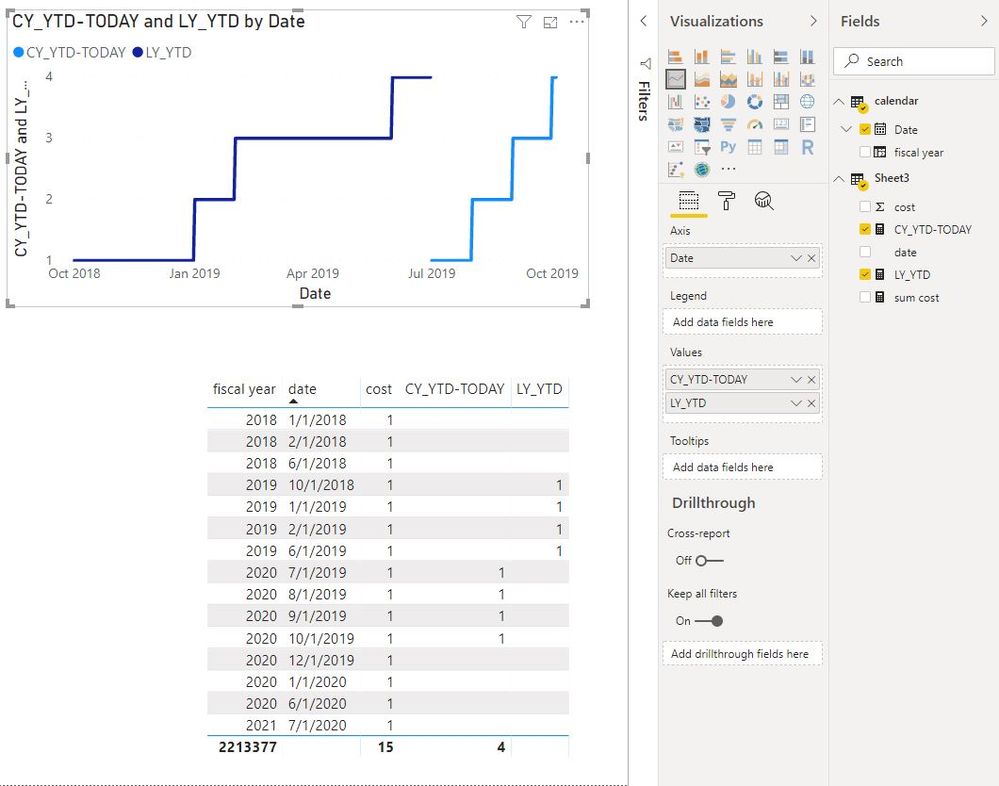
Create two measures

CY_YTD-TODAY =
CALCULATE (
    TOTALYTD (
        [sum cost],
        'calendar'[Date],
        'calendar'[fiscal year]
            = YEAR ( TODAY () ) + 1,
        "6/30"
    ),
    FILTER ( 'calendar', 'calendar'[Date] <= TODAY () )
)

LY_YTD = TOTALYTD([sum cost],'calendar'[Date],'calendar'[fiscal year]=YEAR(TODAY()),"6/30")
Capture2.JPG
Best Regards
Maggie
Community Support Team _ Maggie Li
If this post helps, then please consider Accept it as the solution to help the other members find it more quickly.
 
Anonymous
Not applicable

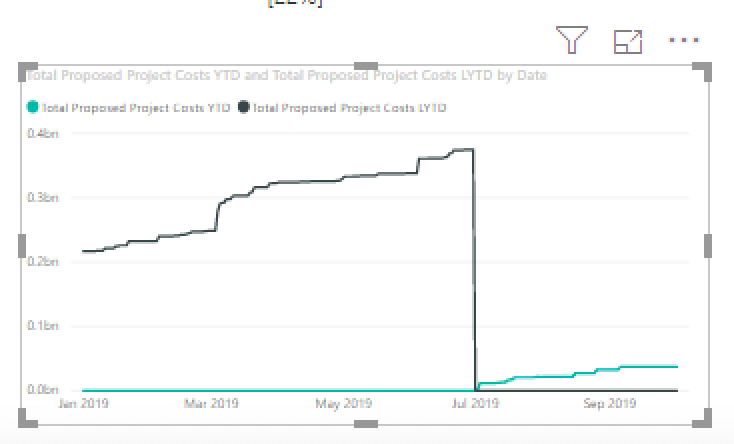
I'm getting closer, but it's still not right.


Screen Shot 2019-10-04 at 12.01.24 PM.png


I'd like both lines to start on the graph in July 2019, so I can direclty see how this year is doing compared to last year by the same point in the year.


I set the filter on the graph to relative date filtering for dates in this year, but that leaves the tail on the left. I want the graph to start on July 1 of whatever current fiscal year we are in (currently 2020).


Thanks!

Helpful resources

Announcements
Power BI DataViz World Championships

Power BI Dataviz World Championships

The Power BI Data Visualization World Championships is back! Get ahead of the game and start preparing now!

December 2025 Power BI Update Carousel

Power BI Monthly Update - December 2025

Check out the December 2025 Power BI Holiday Recap!

FabCon Atlanta 2026 carousel

FabCon Atlanta 2026

Join us at FabCon Atlanta, March 16-20, for the ultimate Fabric, Power BI, AI and SQL community-led event. Save $200 with code FABCOMM.