FabCon is coming to Atlanta
Join us at FabCon Atlanta from March 16 - 20, 2026, for the ultimate Fabric, Power BI, AI and SQL community-led event. Save $200 with code FABCOMM.
Register now!- Power BI forums
- Get Help with Power BI
- Desktop
- Service
- Report Server
- Power Query
- Mobile Apps
- Developer
- DAX Commands and Tips
- Custom Visuals Development Discussion
- Health and Life Sciences
- Power BI Spanish forums
- Translated Spanish Desktop
- Training and Consulting
- Instructor Led Training
- Dashboard in a Day for Women, by Women
- Galleries
- Data Stories Gallery
- Themes Gallery
- Contests Gallery
- QuickViz Gallery
- Quick Measures Gallery
- Visual Calculations Gallery
- Notebook Gallery
- Translytical Task Flow Gallery
- TMDL Gallery
- R Script Showcase
- Webinars and Video Gallery
- Ideas
- Custom Visuals Ideas (read-only)
- Issues
- Issues
- Events
- Upcoming Events
The Power BI Data Visualization World Championships is back! Get ahead of the game and start preparing now! Learn more
- Power BI forums
- Forums
- Get Help with Power BI
- Desktop
- YTD Month count to create moving target
- Subscribe to RSS Feed
- Mark Topic as New
- Mark Topic as Read
- Float this Topic for Current User
- Bookmark
- Subscribe
- Printer Friendly Page

- Mark as New
- Bookmark
- Subscribe
- Mute
- Subscribe to RSS Feed
- Permalink
- Report Inappropriate Content
YTD Month count to create moving target
I have seen simular questions, however it is still not working the way I want.
I would like to create a measure that devides my target by 12 and grows by the number of months.
Than when I put it in a bar chart together with my actual data it will show the difference. Like in the picture below:
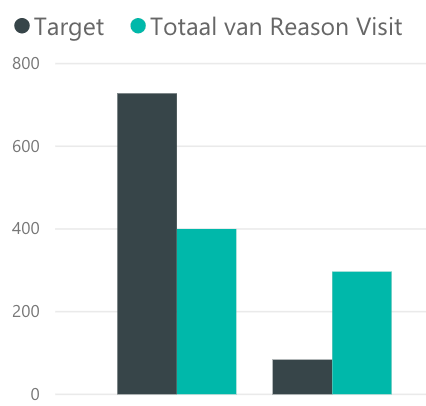
So if the target is "1200" and today is "13 March" the target will show "300"


- Mark as New
- Bookmark
- Subscribe
- Mute
- Subscribe to RSS Feed
- Permalink
- Report Inappropriate Content
@Anonymous
Something like this...may be
Measure =
VAR Target = 1200
RETURN
    Target * MONTH ( SELECTEDVALUE ( Table1[Date] ) )
        / 12
Regards
Zubair
Please try my custom visuals
- Mark as New
- Bookmark
- Subscribe
- Mute
- Subscribe to RSS Feed
- Permalink
- Report Inappropriate Content
Thank you very much for your reply
I don't really get what you mean, because the formula is not working.
Besides I have the target 1200 already in a table:
Person Catogary Target | Calculated column
Person A A 1200 | 300
Person A B 1400 | 117
Person B A 800 | 67
Person B B 1400 | 117
Maybe it would be better to make a calculated column as shown above. In this example it is still March
How would I do that?
- Mark as New
- Bookmark
- Subscribe
- Mute
- Subscribe to RSS Feed
- Permalink
- Report Inappropriate Content
I have been trying some things and came to the following formula:
YTD Target = ('Table'[Target]/12)*MONTH(TODAY())And it shows the right values. So according to the sample above the value shows (given the fact it is januari now):
Person Catogary Target | Calculated column
Person A A 1200 | 100
Person A B 1400 | 116,66
Person B A 800 | 66,66
Person B B 1400 | 116,66
However, I am not sure if in february the column will change to:
200
233,33
133,33
233,33
Is there a way I can check this? Or does anyone know if this is the right formula to get the desired result?


- Mark as New
- Bookmark
- Subscribe
- Mute
- Subscribe to RSS Feed
- Permalink
- Report Inappropriate Content
Hi,
Your formula should ideally be a measure (not a calculated column formula). It will be ideal to have a date column in your base data. Do you not have that? Also, what do you wnat to show on the X-axis?
Regards,
Ashish Mathur
http://www.ashishmathur.com
https://www.linkedin.com/in/excelenthusiasts/
- Mark as New
- Bookmark
- Subscribe
- Mute
- Subscribe to RSS Feed
- Permalink
- Report Inappropriate Content
Thanks for your reply.
I do have a seperate calander table. What do you mean with a date column?
On the X-axis I want to show the reason of visit as discussed in this topic: Create column filled with measures
- Mark as New
- Bookmark
- Subscribe
- Mute
- Subscribe to RSS Feed
- Permalink
- Report Inappropriate Content
Hi,
Your formula should work. Write that as a measure though instead of a calculated column formula.
Regards,
Ashish Mathur
http://www.ashishmathur.com
https://www.linkedin.com/in/excelenthusiasts/


- Mark as New
- Bookmark
- Subscribe
- Mute
- Subscribe to RSS Feed
- Permalink
- Report Inappropriate Content
Hi @Anonymous,
Please link a date to your target and add a date table to your model and then you can compute easily a formula to create YTD.
Let us know if it not what you desire...
Ninter.
Helpful resources

Power BI Dataviz World Championships
The Power BI Data Visualization World Championships is back! Get ahead of the game and start preparing now!

Power BI Monthly Update - December 2025
Check out the December 2025 Power BI Holiday Recap!

FabCon Atlanta 2026
Join us at FabCon Atlanta, March 16-20, for the ultimate Fabric, Power BI, AI and SQL community-led event. Save $200 with code FABCOMM.

| User | Count |
|---|---|
| 38 | |
| 36 | |
| 33 | |
| 31 | |
| 28 |


| User | Count |
|---|---|
| 129 | |
| 88 | |
| 79 | |
| 68 | |
| 63 |


