Join us at FabCon Atlanta from March 16 - 20, 2026, for the ultimate Fabric, Power BI, AI and SQL community-led event. Save $200 with code FABCOMM.
Register now!The Power BI Data Visualization World Championships is back! Get ahead of the game and start preparing now! Learn more
Hi Community,
Apologies for a lenghty ask but, I am trying to understand what will be the best way to do this?
I am very new to Power BI so will appreciate your support.
1. Anchor Date Parameter - Helps user lock date range (User can customise the date for YTD & MTD by choosing this parameter)
2. Fiscal Year - Starts 01st August every year & ends 31st July
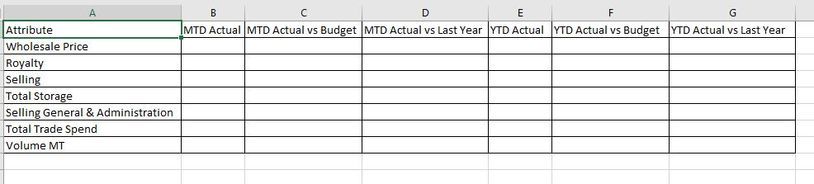
3. Calculate YTD, MTD values with variances (difference in percentage) against various versions such as versus Budget, versus Last Year etc.
Link to the PBIX workbook:
Attached screenshot of expected output.
Solved! Go to Solution.
@pbiguru_1day , I think MTD will have no difference, with date table and time intelligence
MTD Sales = CALCULATE(SUM(Sales[Sales Amount]),DATESMTD('Date'[Date]))
last MTD Sales = CALCULATE(SUM(Sales[Sales Amount]),DATESMTD(dateadd('Date'[Date],-1,MONTH)))
last month Sales = CALCULATE(SUM(Sales[Sales Amount]),previousmonth('Date'[Date]))
next month Sales = CALCULATE(SUM(Sales[Sales Amount]),nextmonth('Date'[Date]))
this month = CALCULATE(SUM(Sales[Sales Amount]),DATESMTD(ENDOFMONTH('Date'[Date])))
ytd you can use end date
YTD Sales = CALCULATE(SUM(Sales[Sales Amount]),DATESYTD('Date'[Date],"7/31"))
Last YTD Sales = CALCULATE(SUM(Sales[Sales Amount]),DATESYTD(dateadd('Date'[Date],-1,Year),"7/31"))
This year Sales = CALCULATE(SUM(Sales[Sales Amount]),DATESYTD(ENDOFYEAR('Date'[Date]),"7/31"))
Last year Sales = CALCULATE(SUM(Sales[Sales Amount]),DATESYTD(ENDOFYEAR(dateadd('Date'[Date],-1,Year)),"7/31"))
For the display, you might need a calculation group
Calculation Groups- Measure Slicer, Measure Header Grouping, Measure to dimension conversion. Complex Table display : https://youtu.be/qMNv67P8Go0
Time Intelligence, DATESMTD, DATESQTD, DATESYTD, Week On Week, Week Till Date, Custom Period on Period,
Custom Period till date: https://youtu.be/aU2aKbnHuWs&t=145s
Power BI — Year on Year with or Without Time Intelligence
https://medium.com/@amitchandak.1978/power-bi-ytd-questions-time-intelligence-1-5-e3174b39f38a
https://www.youtube.com/watch?v=km41KfM_0uA
Power BI — Qtr on Qtr with or Without Time Intelligence
https://medium.com/@amitchandak.1978/power-bi-qtd-questions-time-intelligence-2-5-d842063da839
https://www.youtube.com/watch?v=8-TlVx7P0A0
Power BI — Month on Month with or Without Time Intelligence
https://medium.com/@amitchandak.1978/power-bi-mtd-questions-time-intelligence-3-5-64b0b4a4090e
https://www.youtube.com/watch?v=6LUBbvcxtKA
@pbiguru_1day , I think MTD will have no difference, with date table and time intelligence
MTD Sales = CALCULATE(SUM(Sales[Sales Amount]),DATESMTD('Date'[Date]))
last MTD Sales = CALCULATE(SUM(Sales[Sales Amount]),DATESMTD(dateadd('Date'[Date],-1,MONTH)))
last month Sales = CALCULATE(SUM(Sales[Sales Amount]),previousmonth('Date'[Date]))
next month Sales = CALCULATE(SUM(Sales[Sales Amount]),nextmonth('Date'[Date]))
this month = CALCULATE(SUM(Sales[Sales Amount]),DATESMTD(ENDOFMONTH('Date'[Date])))
ytd you can use end date
YTD Sales = CALCULATE(SUM(Sales[Sales Amount]),DATESYTD('Date'[Date],"7/31"))
Last YTD Sales = CALCULATE(SUM(Sales[Sales Amount]),DATESYTD(dateadd('Date'[Date],-1,Year),"7/31"))
This year Sales = CALCULATE(SUM(Sales[Sales Amount]),DATESYTD(ENDOFYEAR('Date'[Date]),"7/31"))
Last year Sales = CALCULATE(SUM(Sales[Sales Amount]),DATESYTD(ENDOFYEAR(dateadd('Date'[Date],-1,Year)),"7/31"))
For the display, you might need a calculation group
Calculation Groups- Measure Slicer, Measure Header Grouping, Measure to dimension conversion. Complex Table display : https://youtu.be/qMNv67P8Go0
Time Intelligence, DATESMTD, DATESQTD, DATESYTD, Week On Week, Week Till Date, Custom Period on Period,
Custom Period till date: https://youtu.be/aU2aKbnHuWs&t=145s
Power BI — Year on Year with or Without Time Intelligence
https://medium.com/@amitchandak.1978/power-bi-ytd-questions-time-intelligence-1-5-e3174b39f38a
https://www.youtube.com/watch?v=km41KfM_0uA
Power BI — Qtr on Qtr with or Without Time Intelligence
https://medium.com/@amitchandak.1978/power-bi-qtd-questions-time-intelligence-2-5-d842063da839
https://www.youtube.com/watch?v=8-TlVx7P0A0
Power BI — Month on Month with or Without Time Intelligence
https://medium.com/@amitchandak.1978/power-bi-mtd-questions-time-intelligence-3-5-64b0b4a4090e
https://www.youtube.com/watch?v=6LUBbvcxtKA
The Power BI Data Visualization World Championships is back! Get ahead of the game and start preparing now!
Check out the November 2025 Power BI update to learn about new features.
| User | Count |
|---|---|
| 59 | |
| 43 | |
| 42 | |
| 23 | |
| 17 |
| User | Count |
|---|---|
| 190 | |
| 122 | |
| 96 | |
| 66 | |
| 47 |