Join us at FabCon Atlanta from March 16 - 20, 2026, for the ultimate Fabric, Power BI, AI and SQL community-led event. Save $200 with code FABCOMM.
Register now!Get Fabric Certified for FREE during Fabric Data Days. Don't miss your chance! Request now
Hi Community,
Apologies for a lenghty ask but, I am trying to understand what will be the best way to do this?
I am very new to Power BI so will appreciate your support.
1. Anchor Date Parameter - Helps user lock date range (User can customise the date for YTD & MTD by choosing this parameter)
2. Fiscal Year - Starts 01st August every year & ends 31st July
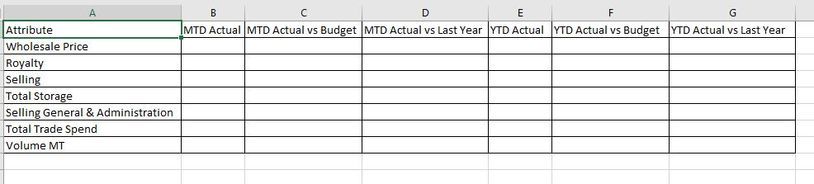
3. Calculate YTD, MTD values with variances (difference in percentage) against various versions such as versus Budget, versus Last Year etc.
Link to the PBIX workbook:
Attached screenshot of expected output.
Solved! Go to Solution.
@pbiguru_1day , I think MTD will have no difference, with date table and time intelligence
MTD Sales = CALCULATE(SUM(Sales[Sales Amount]),DATESMTD('Date'[Date]))
last MTD Sales = CALCULATE(SUM(Sales[Sales Amount]),DATESMTD(dateadd('Date'[Date],-1,MONTH)))
last month Sales = CALCULATE(SUM(Sales[Sales Amount]),previousmonth('Date'[Date]))
next month Sales = CALCULATE(SUM(Sales[Sales Amount]),nextmonth('Date'[Date]))
this month = CALCULATE(SUM(Sales[Sales Amount]),DATESMTD(ENDOFMONTH('Date'[Date])))
ytd you can use end date
YTD Sales = CALCULATE(SUM(Sales[Sales Amount]),DATESYTD('Date'[Date],"7/31"))
Last YTD Sales = CALCULATE(SUM(Sales[Sales Amount]),DATESYTD(dateadd('Date'[Date],-1,Year),"7/31"))
This year Sales = CALCULATE(SUM(Sales[Sales Amount]),DATESYTD(ENDOFYEAR('Date'[Date]),"7/31"))
Last year Sales = CALCULATE(SUM(Sales[Sales Amount]),DATESYTD(ENDOFYEAR(dateadd('Date'[Date],-1,Year)),"7/31"))
For the display, you might need a calculation group
Calculation Groups- Measure Slicer, Measure Header Grouping, Measure to dimension conversion. Complex Table display : https://youtu.be/qMNv67P8Go0
Time Intelligence, DATESMTD, DATESQTD, DATESYTD, Week On Week, Week Till Date, Custom Period on Period,
Custom Period till date: https://youtu.be/aU2aKbnHuWs&t=145s
Power BI — Year on Year with or Without Time Intelligence
https://medium.com/@amitchandak.1978/power-bi-ytd-questions-time-intelligence-1-5-e3174b39f38a
https://www.youtube.com/watch?v=km41KfM_0uA
Power BI — Qtr on Qtr with or Without Time Intelligence
https://medium.com/@amitchandak.1978/power-bi-qtd-questions-time-intelligence-2-5-d842063da839
https://www.youtube.com/watch?v=8-TlVx7P0A0
Power BI — Month on Month with or Without Time Intelligence
https://medium.com/@amitchandak.1978/power-bi-mtd-questions-time-intelligence-3-5-64b0b4a4090e
https://www.youtube.com/watch?v=6LUBbvcxtKA
@pbiguru_1day , I think MTD will have no difference, with date table and time intelligence
MTD Sales = CALCULATE(SUM(Sales[Sales Amount]),DATESMTD('Date'[Date]))
last MTD Sales = CALCULATE(SUM(Sales[Sales Amount]),DATESMTD(dateadd('Date'[Date],-1,MONTH)))
last month Sales = CALCULATE(SUM(Sales[Sales Amount]),previousmonth('Date'[Date]))
next month Sales = CALCULATE(SUM(Sales[Sales Amount]),nextmonth('Date'[Date]))
this month = CALCULATE(SUM(Sales[Sales Amount]),DATESMTD(ENDOFMONTH('Date'[Date])))
ytd you can use end date
YTD Sales = CALCULATE(SUM(Sales[Sales Amount]),DATESYTD('Date'[Date],"7/31"))
Last YTD Sales = CALCULATE(SUM(Sales[Sales Amount]),DATESYTD(dateadd('Date'[Date],-1,Year),"7/31"))
This year Sales = CALCULATE(SUM(Sales[Sales Amount]),DATESYTD(ENDOFYEAR('Date'[Date]),"7/31"))
Last year Sales = CALCULATE(SUM(Sales[Sales Amount]),DATESYTD(ENDOFYEAR(dateadd('Date'[Date],-1,Year)),"7/31"))
For the display, you might need a calculation group
Calculation Groups- Measure Slicer, Measure Header Grouping, Measure to dimension conversion. Complex Table display : https://youtu.be/qMNv67P8Go0
Time Intelligence, DATESMTD, DATESQTD, DATESYTD, Week On Week, Week Till Date, Custom Period on Period,
Custom Period till date: https://youtu.be/aU2aKbnHuWs&t=145s
Power BI — Year on Year with or Without Time Intelligence
https://medium.com/@amitchandak.1978/power-bi-ytd-questions-time-intelligence-1-5-e3174b39f38a
https://www.youtube.com/watch?v=km41KfM_0uA
Power BI — Qtr on Qtr with or Without Time Intelligence
https://medium.com/@amitchandak.1978/power-bi-qtd-questions-time-intelligence-2-5-d842063da839
https://www.youtube.com/watch?v=8-TlVx7P0A0
Power BI — Month on Month with or Without Time Intelligence
https://medium.com/@amitchandak.1978/power-bi-mtd-questions-time-intelligence-3-5-64b0b4a4090e
https://www.youtube.com/watch?v=6LUBbvcxtKA
Check out the November 2025 Power BI update to learn about new features.
Advance your Data & AI career with 50 days of live learning, contests, hands-on challenges, study groups & certifications and more!