Join us at FabCon Atlanta from March 16 - 20, 2026, for the ultimate Fabric, Power BI, AI and SQL community-led event. Save $200 with code FABCOMM.
Register now!Learn from the best! Meet the four finalists headed to the FINALS of the Power BI Dataviz World Championships! Register now
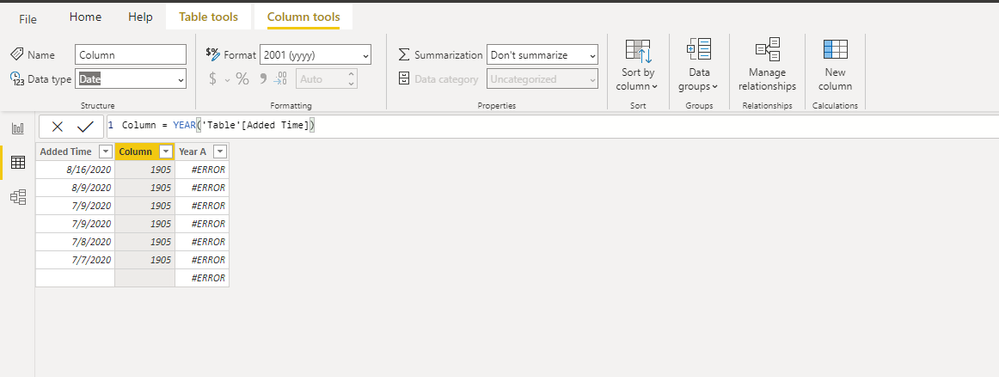
i write this formula:
Solved! Go to Solution.
Hi, @waleed111
I can reproduce your issue here.
I guess that you column "Year A" is of type "DATE".
As mentioned in this document ,function "Year" returns the year of a date as a four digit integer in the range 1900-9999.
It is suggest to convert your column "Year A" to type "text"
Best Regards,
Community Support Team _ Eason
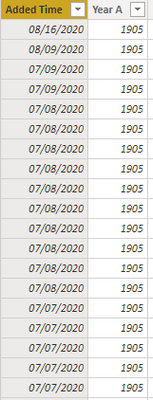
It is of type date.
@waleed111 , this is strange, Can you share sample pbix after removing sensitive data.
Try this
Year A = format('[Added Time],"YYYY")
Hope you do not have another table. Try without a table name
Year A = YEAR('[Added Time])
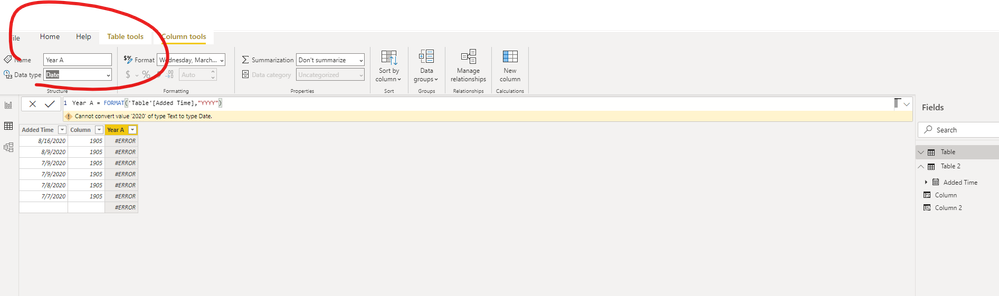
when i use:
Year A = format('[Added Time],"YYYY")
it show me this error: cannot convert value to date.
Hi, @waleed111
I can reproduce your issue here.
I guess that you column "Year A" is of type "DATE".
As mentioned in this document ,function "Year" returns the year of a date as a four digit integer in the range 1900-9999.
It is suggest to convert your column "Year A" to type "text"
Best Regards,
Community Support Team _ Eason
Share feedback directly with Fabric product managers, participate in targeted research studies and influence the Fabric roadmap.
Check out the February 2026 Power BI update to learn about new features.
| User | Count |
|---|---|
| 68 | |
| 61 | |
| 45 | |
| 19 | |
| 15 |
| User | Count |
|---|---|
| 108 | |
| 108 | |
| 39 | |
| 30 | |
| 26 |