Share feedback directly with Fabric product managers, participate in targeted research studies and influence the Fabric roadmap.
Sign up nowGet Fabric certified for FREE! Don't miss your chance! Learn more
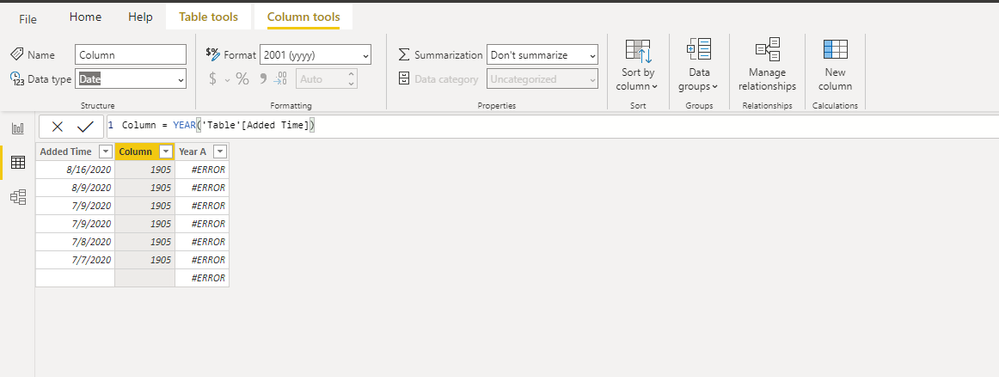
i write this formula:
Solved! Go to Solution.
Hi, @waleed111
I can reproduce your issue here.
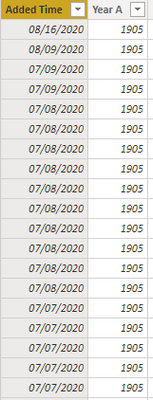
I guess that you column "Year A" is of type "DATE".
As mentioned in this document ,function "Year" returns the year of a date as a four digit integer in the range 1900-9999.
It is suggest to convert your column "Year A" to type "text"
Best Regards,
Community Support Team _ Eason
It is of type date.
@waleed111 , this is strange, Can you share sample pbix after removing sensitive data.
Try this
Year A = format('[Added Time],"YYYY")
Hope you do not have another table. Try without a table name
Year A = YEAR('[Added Time])
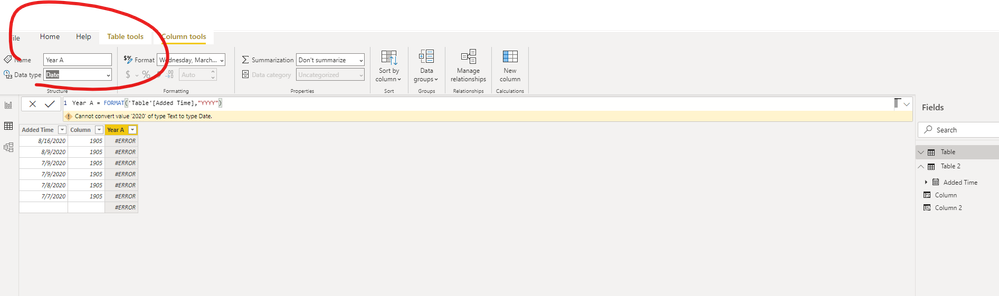
when i use:
Year A = format('[Added Time],"YYYY")
it show me this error: cannot convert value to date.
Hi, @waleed111
I can reproduce your issue here.
I guess that you column "Year A" is of type "DATE".
As mentioned in this document ,function "Year" returns the year of a date as a four digit integer in the range 1900-9999.
It is suggest to convert your column "Year A" to type "text"
Best Regards,
Community Support Team _ Eason
If you love stickers, then you will definitely want to check out our Community Sticker Challenge!
Check out the January 2026 Power BI update to learn about new features.
| User | Count |
|---|---|
| 62 | |
| 58 | |
| 45 | |
| 21 | |
| 18 |
| User | Count |
|---|---|
| 121 | |
| 116 | |
| 37 | |
| 34 | |
| 30 |