
cancel
Showing results for 
Search instead for 
Did you mean: 

Get Fabric Certified for FREE during Fabric Data Days. Don't miss your chance! Request now

Reply
ToMaSnAw
Regular Visitor

Wrong date formatting - FORMAT(Date, "MM")


Hi,

I would like to have my chart labelled with month/year format type "06/23" (for June 2023).

I have created Date column with format DD/MM/YY but when I use it on chart I got this

Chart.PNG

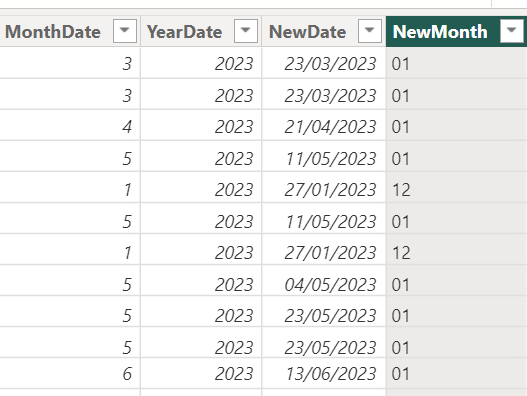
I tried to created separate columns for Month and Year using MONTH and YEAR functions, but still this is not that value I want so I used FORMAT function to get desired month format: NewMonth with "MM" format but I received values completely out of blue (at least for me):

MonthFormat.PNGNewMonth.PNG


Could you please advice where I made a mistake?


Thnak you.


1 ACCEPTED SOLUTION
Idrissshatila
Super User
Super User

Hello @ToMaSnAw ,


use the following :

for full Month Name:

NewMonth = Format( 'TableName' [NewDate],"mmmm")

for Short Month Name:

NewMonth = Format( 'TableName' [NewDate],"mmm")

If I answered your question, please mark my post as solution, Appreciate your Kudos 👍

Follow me on Linkedin
Vote for my Community Mobile App Idea 💡


Did I answer your question? Mark my post as a solution! Appreciate your Kudos
Follow me on LinkedIn linkedIn
Vote for my Community Mobile App Idea

Proud to be a Super User!


View solution in original post

2 REPLIES 2
ToMaSnAw
Regular Visitor

Thanks @Idrissshatila!

I needed extended numeric version "MM", but you pointed that I should set referece to full date not just month value, and with that, using "MM/YY" I got what I needed.chartv2.PNG

Edit:

I just realised that using formatted values it has changed my chart, it is automtically sorting from biggest values on Y-axis, @Idrissshatila do you know by chance how get sorted by X-axis? Is it because I don't have hierarchy on this new column with formatted date?

Edit2: Ok, I found it, on Visual "..." I can can pick which axis is used for sorting

Idrissshatila
Super User
Super User

Hello @ToMaSnAw ,


use the following :

for full Month Name:

NewMonth = Format( 'TableName' [NewDate],"mmmm")

for Short Month Name:

NewMonth = Format( 'TableName' [NewDate],"mmm")

If I answered your question, please mark my post as solution, Appreciate your Kudos 👍

Follow me on Linkedin
Vote for my Community Mobile App Idea 💡


Did I answer your question? Mark my post as a solution! Appreciate your Kudos
Follow me on LinkedIn linkedIn
Vote for my Community Mobile App Idea

Proud to be a Super User!


Helpful resources

Announcements
November Power BI Update Carousel

Power BI Monthly Update - November 2025

Check out the November 2025 Power BI update to learn about new features.

Fabric Data Days Carousel

Fabric Data Days

Advance your Data & AI career with 50 days of live learning, contests, hands-on challenges, study groups & certifications and more!

FabCon Atlanta 2026 carousel

FabCon Atlanta 2026

Join us at FabCon Atlanta, March 16-20, for the ultimate Fabric, Power BI, AI and SQL community-led event. Save $200 with code FABCOMM.

Top Solution Authors
Top Kudoed Authors