Get Fabric or SQL Certified for Free.
Get certified for free when you join Fabric Data Days 2026 and dive into Fabric, Power BI, SQL, AI, and other essential data skills.
Join now- Power BI forums
- Get Help with Power BI
- Desktop
- Service
- Report Server
- Power Query
- Mobile Apps
- Developer
- DAX Commands and Tips
- Custom Visuals Development Discussion
- Health and Life Sciences
- Power BI Spanish forums
- Translated Spanish Desktop
- Training and Consulting
- Instructor Led Training
- Dashboard in a Day for Women, by Women
- Galleries
- Data Stories Gallery
- Themes Gallery
- Contests Gallery
- QuickViz Gallery
- Quick Measures Gallery
- Visual Calculations Gallery
- Notebook Gallery
- Translytical Task Flow Gallery
- TMDL Gallery
- R Script Showcase
- Webinars and Video Gallery
- Ideas
- Custom Visuals Ideas (read-only)
- Issues
- Issues
- Events
- Upcoming Events
July 7 - July 17 | Round 2 of the Power BI Dataviz World Championships. Don't miss your chance! Learn more
- Power BI forums
- Forums
- Get Help with Power BI
- Desktop
- Re: Working with JSON and multiple List
- Subscribe to RSS Feed
- Mark Topic as New
- Mark Topic as Read
- Float this Topic for Current User
- Bookmark
- Subscribe
- Printer Friendly Page

- Mark as New
- Bookmark
- Subscribe
- Mute
- Subscribe to RSS Feed
- Permalink
- Report Inappropriate Content
Working with JSON and multiple List
I'm sure this is a very basic question, so I feel bad bothering you with this.
But I'm stuck with this.
I have imported a JSON file:
{
    "result": [
        {
            "metricId": "xx",
            "data": [
                {
                    "dimensions": [
                        "APPLICATION-aa",
                        "SATISFIED"
                    ],
                    "timestamps": [
                        1585872000000,
                        1586044800000
                    ],
                    "values": [
                        241,
                        1067
                    ]
                },
                {
                    "dimensions": [
                        "APPLICATION-bb",
                        "FRUSTRATED"
                    ],
                    "timestamps": [
                        1585872000000,
                        1586044800000
                    ],
                    "values": [
                        172,
                        771
                    ]
                }
            ]
        }
    ]
}
After
- Converting to table
- Transpose table
- Promote Header (& Change Type)
- Expand the Result
- Expand result.data
- Expand result.data
My imported data has become:
Now my next step is to "Extract Values" from result.data.dimension while adding a delimiter and then split the table by delimiter.

The next step would be to expand the list of result.data.timestamps together with the result.data.values.
Which should give me something like:
| result.metricID | result.data.dimension.1 | result.data.dimension.2 | result.data.timestamps | result.data.values |
| xx | Application-aa | SATISFIED | 1.58587E+12 | 241 |
| xx | Application-aa | SATISFIED | 1.58604E+12 | 1067 |
| xx | Application-bb | FRUSTRATED | 1.58587E+12 | 172 |
| xx | Application-bb | FRUSTRATED | 1.58604E+12 | 771 |
Thanks for your help!
Solved! Go to Solution.
- Mark as New
- Bookmark
- Subscribe
- Mute
- Subscribe to RSS Feed
- Permalink
- Report Inappropriate Content
Many thanks. I actually watched the first video you are referencing just before posting this question 🙂 it does not contain the answer sadly.
I also watched https://www.youtube.com/watch?v=-QO57RHzxus which was quite helpful for the first few steps.
Now, after posting this I just found this:
https://community.powerbi.com/t5/Desktop/How-to-expand-multiple-columns-to-new-rows-at-the-same-time...
Which seems to solve my problem!


- Mark as New
- Bookmark
- Subscribe
- Mute
- Subscribe to RSS Feed
- Permalink
- Report Inappropriate Content
Hi @SysLostInBI
Try this steps
let
    Source = Json.Document(File.Contents("C:\Users\mrepczynski\OneDrive - Network Homes\Desktop\test.json")),
    result = Source[result],
    result1 = result{0},
    data = result1[data],
    Custom1 = Table.FromRecords( data ),
    #"Transposed Table" = Table.Transpose(Custom1),
    #"Added Custom" = Table.AddColumn(#"Transposed Table", "Custom", each List.Combine( { [Column1], [Column2] } )),
    #"Removed Other Columns" = Table.SelectColumns(#"Added Custom",{"Custom"}),
    Custom = Table.FromRows( List.Zip( #"Removed Other Columns"[Custom] ) )
in
    Custom
Mariusz
If this post helps, then please consider Accepting it as the solution.
Please feel free to connect with me.

- Mark as New
- Bookmark
- Subscribe
- Mute
- Subscribe to RSS Feed
- Permalink
- Report Inappropriate Content
Hi @SysLostInBI
I think your json file describes 16 records: 2 dimensions x 2 timestamps x 2 values => 2 x 2 x 2 = 8 and that 2 times.
So the expanded result in Power Query is:
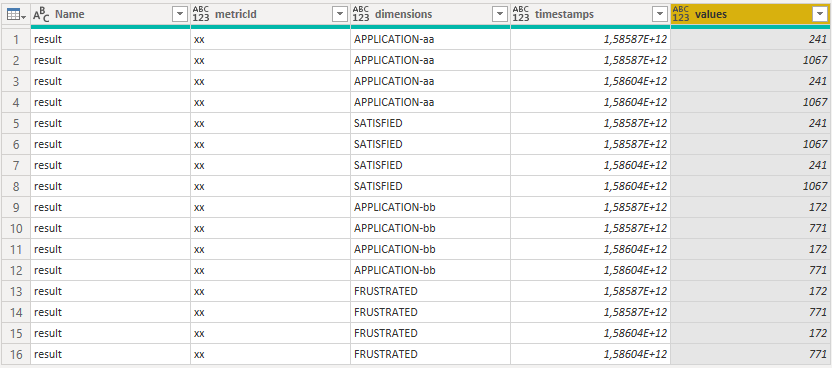
If your json file looks as following you get the expected result.
{
 "result": [
  {
   "metricId": "xx",
   "data": [
    {
     "dimensions": "APPLICATION-aa", "typ":"SATISFIED", "timestamp":1585872000000, "values":241
    },
    {
     "dimensions": "APPLICATION-aa", "typ":"SATISFIED", "timestamp":1586044800000, "values":1067
    },
    {
     "dimensions": "APPLICATION-bb", "typ":"FRUSTRATED", "timestamp":1585872000000, "values":172
    },
    {
     "dimensions": "APPLICATION-bb", "typ":"FRUSTRATED", "timestamp":1586044800000, "values":771
    }
   ]
  }
 ]
}

Regards FrankAT
- Mark as New
- Bookmark
- Subscribe
- Mute
- Subscribe to RSS Feed
- Permalink
- Report Inappropriate Content
Thanks, but no. The JSON is actually formed as I described it.
It originates from a commercial product and I have to deal with it 🙂


- Mark as New
- Bookmark
- Subscribe
- Mute
- Subscribe to RSS Feed
- Permalink
- Report Inappropriate Content
- Mark as New
- Bookmark
- Subscribe
- Mute
- Subscribe to RSS Feed
- Permalink
- Report Inappropriate Content
Many thanks. I actually watched the first video you are referencing just before posting this question 🙂 it does not contain the answer sadly.
I also watched https://www.youtube.com/watch?v=-QO57RHzxus which was quite helpful for the first few steps.
Now, after posting this I just found this:
https://community.powerbi.com/t5/Desktop/How-to-expand-multiple-columns-to-new-rows-at-the-same-time...
Which seems to solve my problem!

Helpful resources

FabCon & SQLCon – Barcelona 2026
Join us in Barcelona for FabCon and SQLCon, the Fabric, Power BI, SQL, and AI community event. Save €200 with code FABCMTY200.

Data Days 2026
Join Data Days 2026: 60 days of free live/on-demand sessions, challenges, study groups, and certification opportunities.

Power BI DataViz World Championships - June 2026
A new Power BI DataViz World Championship is coming this June! Don't miss out on submitting your entry.

| User | Count |
|---|---|
| 27 | |
| 23 | |
| 18 | |
| 18 | |
| 15 |


| User | Count |
|---|---|
| 54 | |
| 44 | |
| 42 | |
| 39 | |
| 36 |


