
cancel
Showing results for 
Search instead for 
Did you mean: 

July 7 - July 17 | Round 2 of the Power BI Dataviz World Championships. Don't miss your chance! Learn more

Reply
SysLostInBI
Frequent Visitor

Working with JSON and multiple List

I'm sure this is a very basic question, so I feel bad bothering you with this.

But I'm stuck with this.


I have imported a JSON file:

{
    "result": [
        {
            "metricId""xx",
            "data": [
                {
                    "dimensions": [
                        "APPLICATION-aa",
                        "SATISFIED"
                    ],
                    "timestamps": [
                        1585872000000,
                        1586044800000
                    ],
                    "values": [
                        241,
                        1067
                    ]
                },
                {
                    "dimensions": [
                        "APPLICATION-bb",
                        "FRUSTRATED"
                    ],
                    "timestamps": [
                        1585872000000,
                        1586044800000
                    ],
                    "values": [
                        172,
                        771
                    ]
                }
            ]
        }
    ]
}

After 

  • Converting to table
  • Transpose table
  • Promote Header (& Change Type)
  • Expand the Result
  • Expand result.data
  • Expand result.data

My imported data has become:


 Now my next step is to "Extract Values" from result.data.dimension while adding a delimiter and then split the table by delimiter.
2020-08-18 16_29_28-xx - Power Query Editor.png

The next step would be to expand the list of result.data.timestamps together with the result.data.values.
Which should give me something like:

result.metricIDresult.data.dimension.1result.data.dimension.2result.data.timestampsresult.data.values
xxApplication-aaSATISFIED1.58587E+12241
xxApplication-aaSATISFIED1.58604E+121067
xxApplication-bbFRUSTRATED1.58587E+12172
xxApplication-bbFRUSTRATED1.58604E+12771


Thanks for your help!

1 ACCEPTED SOLUTION

Many thanks. I actually watched the first video you are referencing just before posting this question 🙂 it does not contain the answer sadly.
I also watched https://www.youtube.com/watch?v=-QO57RHzxus which was quite helpful for the first few steps.


Now, after posting this I just found this:
https://community.powerbi.com/t5/Desktop/How-to-expand-multiple-columns-to-new-rows-at-the-same-time...

Which seems to solve my problem!

View solution in original post

5 REPLIES 5
Mariusz
Community Champion
Community Champion

Hi @SysLostInBI 


Try this steps

let
    Source = Json.Document(File.Contents("C:\Users\mrepczynski\OneDrive - Network Homes\Desktop\test.json")),
    result = Source[result],
    result1 = result{0},
    data = result1[data],
    Custom1 = Table.FromRecords( data ),
    #"Transposed Table" = Table.Transpose(Custom1),
    #"Added Custom" = Table.AddColumn(#"Transposed Table", "Custom", each List.Combine( { [Column1], [Column2] } )),
    #"Removed Other Columns" = Table.SelectColumns(#"Added Custom",{"Custom"}),
    Custom = Table.FromRows( List.Zip( #"Removed Other Columns"[Custom] ) )
in
    Custom


Best Regards,
Mariusz

If this post helps, then please consider Accepting it as the solution.

Please feel free to connect with me.
LinkedIn


FrankAT
Community Champion
Community Champion

Hi @SysLostInBI 

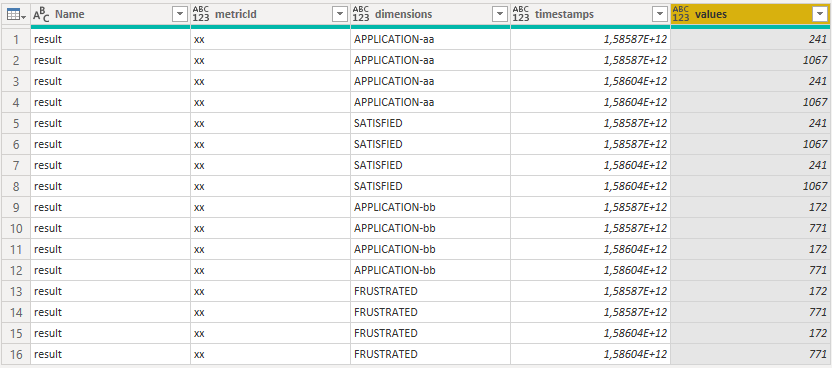
I think your json file describes 16 records: 2 dimensions x 2 timestamps x 2 values => 2 x 2 x 2 = 8 and that 2 times.

So the expanded result in Power Query is:


18-08-_2020_17-44-07.png


If your json file looks as following you get the expected result.

{
 "result": [
  {
   "metricId": "xx",
   "data": [
    {
     "dimensions": "APPLICATION-aa", "typ":"SATISFIED", "timestamp":1585872000000, "values":241
    },
    {
     "dimensions": "APPLICATION-aa", "typ":"SATISFIED", "timestamp":1586044800000, "values":1067
    },
    {
     "dimensions": "APPLICATION-bb", "typ":"FRUSTRATED", "timestamp":1585872000000, "values":172
    },
    {
     "dimensions": "APPLICATION-bb", "typ":"FRUSTRATED", "timestamp":1586044800000, "values":771
    }
   ]
  }
 ]
}


18-08-_2020_17-47-25.png


Regards FrankAT

Thanks, but no. The JSON is actually formed as I described it. 

It originates from a commercial product and I have to deal with it 🙂

amitchandak
Super User
Super User

Many thanks. I actually watched the first video you are referencing just before posting this question 🙂 it does not contain the answer sadly.
I also watched https://www.youtube.com/watch?v=-QO57RHzxus which was quite helpful for the first few steps.


Now, after posting this I just found this:
https://community.powerbi.com/t5/Desktop/How-to-expand-multiple-columns-to-new-rows-at-the-same-time...

Which seems to solve my problem!

Helpful resources

Announcements
FabCon and SQLCon Barcelona 2026

FabCon & SQLCon – Barcelona 2026

Join us in Barcelona for FabCon and SQLCon, the Fabric, Power BI, SQL, and AI community event. Save €200 with code FABCMTY200.

60 days of Data Days Carousel

Data Days 2026

Join Fabric Data Days 2026: 60 days of free live/on-demand sessions, challenges, study groups, and certification opportunities.

Power BI DataViz World Championships carousel

Power BI DataViz World Championships - June 2026

A new Power BI DataViz World Championship is coming this June! Don't miss out on submitting your entry.

Top Solution Authors