Don't miss your chance to take the Fabric Data Engineer (DP-600) exam for FREE! Find out how by watching the DP-600 session on-demand now through April 28th.
Learn moreJoin the FabCon + SQLCon recap series. Up next: Power BI, Real-Time Intelligence, IQ and AI, and Data Factory take center stage. All sessions are available on-demand after the live show. Register now
Hi,
How do I work out the difference between rows?
I have the below dataset but would like to create the column "Power Used" this would show me as below;
| Date | Name | Power | Power Used |
| 03/05/2021 12:38 | Projector1 | 963420 | 4 |
| 03/05/2021 12:54 | Projector1 | 963424 | 4 |
| 03/05/2021 13:10 | Projector1 | 963428 | 3 |
| 03/05/2021 13:26 | Projector1 | 963431 | 4 |
| 03/05/2021 13:42 | Projector1 | 963435 | 4 |
| 03/05/2021 13:58 | Projector1 | 963439 | 4 |
| 05/05/2021 04:12 | Computer | 3000869 | 17 |
| 05/05/2021 04:28 | Computer | 3000886 | 17 |
| 05/05/2021 04:44 | Computer | 3000903 | 18 |
| 05/05/2021 05:00 | Computer | 3000921 | 19 |
| 05/05/2021 05:16 | Computer | 3000940 | 17 |
| 05/05/2021 03:24 | Light | 7580555 | 21 |
| 05/05/2021 03:40 | Light | 7580576 | 25 |
| 05/05/2021 03:56 | Light | 7580601 | 23 |
| 05/05/2021 04:12 | Light | 7580624 | 23 |
| 05/05/2021 04:28 | Light | 7580647 | 23 |
| 05/05/2021 04:44 | Light | 7580670 | 21 |
Is there a way to do this in the M Code?
Thanks
Solved! Go to Solution.
Hi, @MrGriff
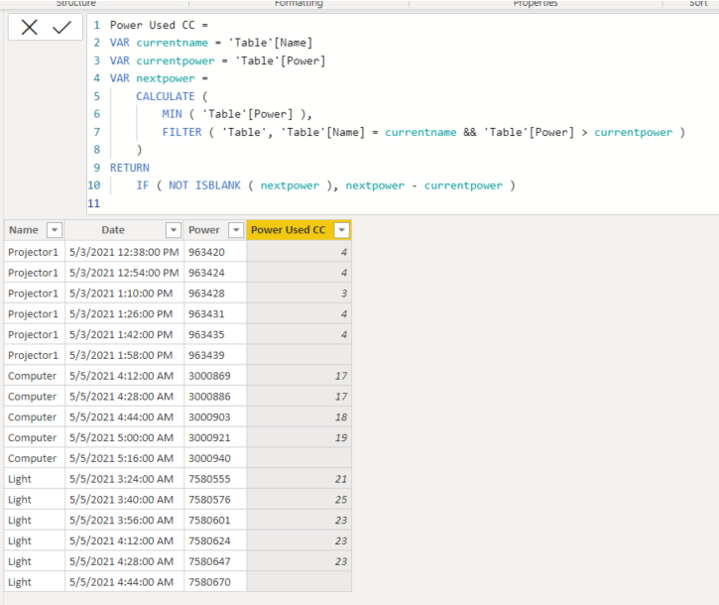
Please check the below picture and the formula for creating a new column.
Hi, My name is Jihwan Kim.
If this post helps, then please consider accept it as the solution to help other members find it faster, and give a big thumbs up.
Linkedin: linkedin.com/in/jihwankim1975/
Twitter: twitter.com/Jihwan_JHKIM
Hi, @MrGriff
Please check the below picture and the formula for creating a new column.
Hi, My name is Jihwan Kim.
If this post helps, then please consider accept it as the solution to help other members find it faster, and give a big thumbs up.
Linkedin: linkedin.com/in/jihwankim1975/
Twitter: twitter.com/Jihwan_JHKIM
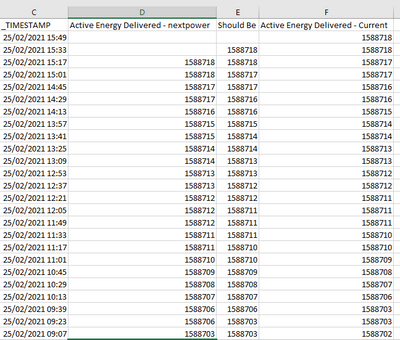
Sorry to re-open this again but I have seen that the calculation is wrong, If the current and next power are the calculation just looks a the next value that is higher in value... but really I if the value is the same the result should be 0..
If you can help that would be great
Check out the April 2026 Power BI update to learn about new features.
If you have recently started exploring Fabric, we'd love to hear how it's going. Your feedback can help with product improvements.
A new Power BI DataViz World Championship is coming this June! Don't miss out on submitting your entry.
| User | Count |
|---|---|
| 41 | |
| 37 | |
| 34 | |
| 21 | |
| 16 |
| User | Count |
|---|---|
| 64 | |
| 58 | |
| 31 | |
| 25 | |
| 25 |