Join us at FabCon Atlanta from March 16 - 20, 2026, for the ultimate Fabric, Power BI, AI and SQL community-led event. Save $200 with code FABCOMM.
Register now!The Power BI Data Visualization World Championships is back! Get ahead of the game and start preparing now! Learn more
Dear Forum,
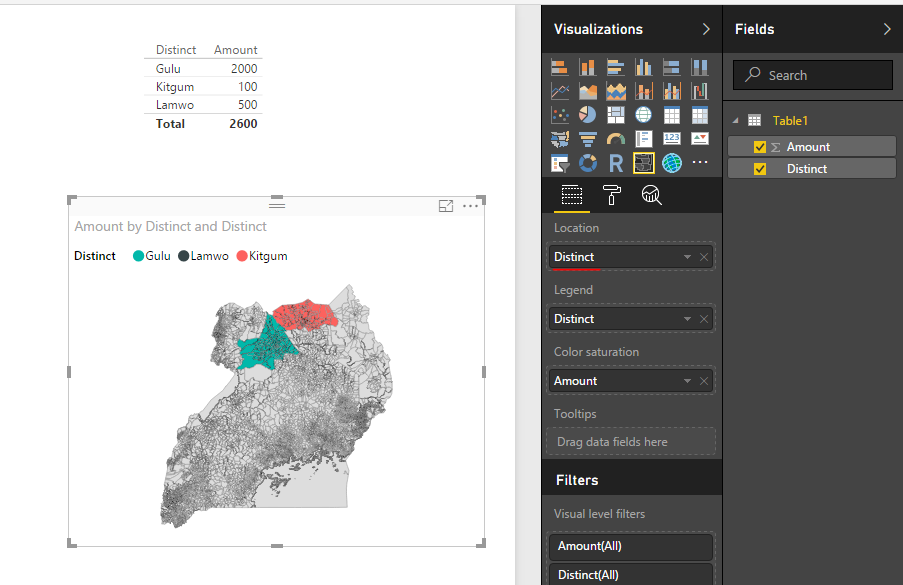
I am desperately trying to create a heat map for some agricultural surveys on sweetpotato virus disease in Uganda, Rwanda, Kenya and Tanzania. The first visualization I want is focused on Uganda. The standard map in Power BI does not have up to date districts and boundaries so I have turned to the Shape Map addin. I was able to convert a UG shape file to the topoJSON format but it does not seem to be working. I have made sure my result set is in the same order as the Legend which is Kitgum, Gulu and Lamwo (this is not in alphabetical order that seems odd to me). I would be very grateful for any help on this.
Best wishes
Jon
In this scenario, it looks like you only put distinct field into Legend. If you need to display the colored shape for those distincts, you need to put the ditinct field into Location. See my sample below:
Regards,
Simon Hou
The Power BI Data Visualization World Championships is back! Get ahead of the game and start preparing now!
| User | Count |
|---|---|
| 39 | |
| 39 | |
| 37 | |
| 29 | |
| 24 |
| User | Count |
|---|---|
| 120 | |
| 95 | |
| 70 | |
| 69 | |
| 65 |