cancel
Showing results for 
Search instead for 
Did you mean: 

The Power BI Data Visualization World Championships is back! Get ahead of the game and start preparing now! Learn more

Reply
sp_mike
Helper II
Helper II

When I click the background in my report all visuals are "hidden" (to the background?)

I have this stange beheaviour. I use a background image and put some visuals on it. However when I click my background, by accident, al my visuals dissapear. I only get them back when I switch to anouther page and return again. Visual header is off.


As my background has three "blocks" I cannnot connect the visuals in order to prevend the user from clicking the background.


Any thoughts?

1 ACCEPTED SOLUTION
mauriciosotero
Resolver III
Resolver III

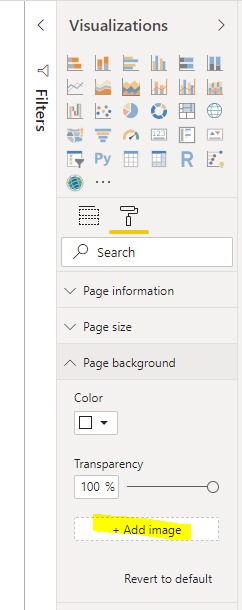
How did you insert this backgound image? Check if was like the image:


Capture2.PNG

View solution in original post

3 REPLIES 3
mauriciosotero
Resolver III
Resolver III

I apreciate if you give me a Kudo (like)

mauriciosotero
Resolver III
Resolver III

How did you insert this backgound image? Check if was like the image:


Capture2.PNG

Great, thanks. I got this one from PowerBI.tips. It seems it was an image put on the background and NOT a background image.

Even the original did not work. So I used the "+ Add Image" and deleted the other one. Problem solved!


Helpful resources

Announcements
Power BI DataViz World Championships

Power BI Dataviz World Championships

The Power BI Data Visualization World Championships is back! Get ahead of the game and start preparing now!

November Power BI Update Carousel

Power BI Monthly Update - November 2025

Check out the November 2025 Power BI update to learn about new features.

FabCon Atlanta 2026 carousel

FabCon Atlanta 2026

Join us at FabCon Atlanta, March 16-20, for the ultimate Fabric, Power BI, AI and SQL community-led event. Save $200 with code FABCOMM.