Join us at FabCon Atlanta from March 16 - 20, 2026, for the ultimate Fabric, Power BI, AI and SQL community-led event. Save $200 with code FABCOMM.
Register now!The Power BI Data Visualization World Championships is back! Get ahead of the game and start preparing now! Learn more
Hi Hi All
I have recently move my raw data to sharepoint , so
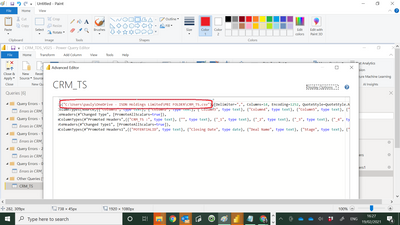
Step 1 i must replace below script with sharepoint path right ?
"C:\Users\pauly\OneDrive - ISDN Holdings Limited\PBI FOLDER\CRM_TS.csv"
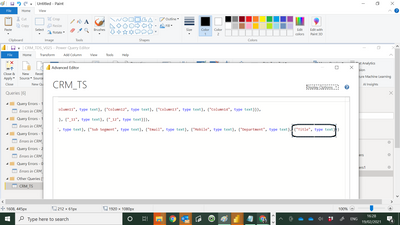
Step 2 I also add one more field = SBU , so i must add below syntax after , {"Title", type text} :-
, {"SBU", type text}
What else i need to take care ?
Paul
Solved! Go to Solution.
@admin11 , better create a new connection and get the script from there and replace in the old connection.
refer my video : https://www.youtube.com/watch?v=h0yLtceT0i4&list=PLPaNVDMhUXGYo50Ajmr4SgSV9HIQLxc8L&index=2
@admin11 , better create a new connection and get the script from there and replace in the old connection.
refer my video : https://www.youtube.com/watch?v=h0yLtceT0i4&list=PLPaNVDMhUXGYo50Ajmr4SgSV9HIQLxc8L&index=2
The Power BI Data Visualization World Championships is back! Get ahead of the game and start preparing now!
| User | Count |
|---|---|
| 67 | |
| 45 | |
| 43 | |
| 36 | |
| 23 |
| User | Count |
|---|---|
| 191 | |
| 127 | |
| 106 | |
| 78 | |
| 53 |