Don't miss your chance to take the Fabric Data Engineer (DP-600) exam for FREE! Find out how by attending the DP-600 session on April 23rd (pacific time), live or on-demand.
Learn moreNext up in the FabCon + SQLCon recap series: The roadmap for Microsoft SQL and Maximizing Developer experiences in Fabric. All sessions are available on-demand after the live show. Register now
Hello! Trying to build what I had assumed was a simple table that is proving much more difficult. My source table is project & team data that looks something like this:
Category Team 1 Team 2 Team 3 Team 4
A 0.5 0 0.6 0.25
A 1.0 0.3 0.5 0
B 0.25 0.75 0 0.5
There are several lines for each category of project - for example, there can be 20 lines of Cat A, 15 of Cat B, etc.
In my dashboard I inserted a table that sums all of the numbers for each column based on Category, with team totals and row totals (inserted as a Calculated Column). So the dashboard table looks something like this, using the data from the example above:
Category Team 1 Team 2 Team 3 Team 4 Total
A 1.5 0.3 1.1 0.25 3.15
B 0.25 0.75 0 0.5 1.5
Total 1.75 1.05 1.1 0.75 4.65
I'm trying to build another table that calculates weighted averages for this data. So for example, I want the number in Category A and Team 1 to calculate this: ((Team 1 total) / (Total total)) * (Team 1 Category A) = ((1.75) / (4.65)) * (1.5). I want this calculation in each of the cells of the table (obviously excluding the Total row/column).
I've tried the Quick Measure for weighted average but couldn't get it to calculate correctly, or have it broken down by the right category (which in this case is named Category). Can anyone help me understand either the way to format the table so I get this information or the DAX equations to use? Thanks!
Solved! Go to Solution.
Hi, try with this:
Step 1: Unpivot Data
Go to Query Editor Select the Category Column and Unpivot Other Columns -- Close & Apply
Step 2: Create a measure:
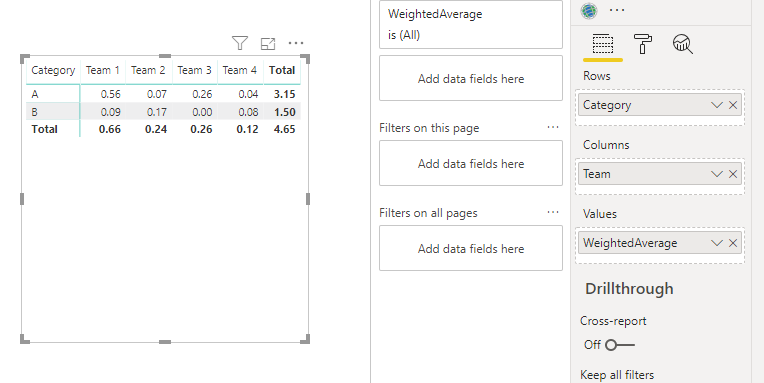
WeightedAverage = VAR _SumValues=SUM(Table1[Value]) VAR _TeamTotal=CALCULATE(SUM(Table1[Value]),ALL(Table1[Category])) VAR _Total=CALCULATE(SUM(Table1[Value]),ALL(Table1)) RETURN DIVIDE(_TeamTotal ,_Total) * _SumValues
Step3 : Use in a matrix visual
Regards
Victor
Thank you!! It worked!
Hi, try with this:
Step 1: Unpivot Data
Go to Query Editor Select the Category Column and Unpivot Other Columns -- Close & Apply
Step 2: Create a measure:
WeightedAverage = VAR _SumValues=SUM(Table1[Value]) VAR _TeamTotal=CALCULATE(SUM(Table1[Value]),ALL(Table1[Category])) VAR _Total=CALCULATE(SUM(Table1[Value]),ALL(Table1)) RETURN DIVIDE(_TeamTotal ,_Total) * _SumValues
Step3 : Use in a matrix visual
Regards
Victor
If you have recently started exploring Fabric, we'd love to hear how it's going. Your feedback can help with product improvements.
A new Power BI DataViz World Championship is coming this June! Don't miss out on submitting your entry.
Share feedback directly with Fabric product managers, participate in targeted research studies and influence the Fabric roadmap.
| User | Count |
|---|---|
| 48 | |
| 43 | |
| 39 | |
| 19 | |
| 17 |
| User | Count |
|---|---|
| 68 | |
| 63 | |
| 31 | |
| 30 | |
| 23 |