cancel
Showing results for 
Search instead for 
Did you mean: 

July 7 - July 17 | Round 2 of the Power BI Dataviz World Championships. Don't miss your chance! Learn more

Reply
fabiolamelo
Helper II
Helper II

Week range filter

Hi everyone,


I created a filter with a week number that works fine. "Weekday number", WEEKNUM( [Date] ),

However, I need to inform the range of the week, for example: 


Today is 15/11/2020
I would like to show in the filter 
W46 - 09/11 to 15/11

For the next weeks
W47 - 16/11 to 22/11.
W48 - 23/11 to 29/11


How can I do that? I tried to find something similar like this on the community but I couldn`t.
Can you please help me?
Thanks.

1 ACCEPTED SOLUTION
CNENFRNL
Community Champion
Community Champion

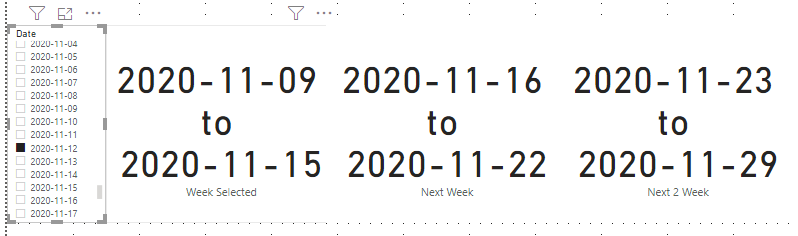
Hi, @fabiolamelo , you might want to try this pattern,


Week Selected = 
VAR __day_selected =
    MAXX ( ALLSELECTED ( 'Calendar'[Date] ), 'Calendar'[Date] )
VAR __start_of_week =
    __day_selected - WEEKDAY ( __day_selected, 2 ) + 1
VAR __week_selected =
    DATESINPERIOD ( 'Calendar'[Date], __start_of_week, 7, DAY )
RETURN
    MINX ( __week_selected, 'Calendar'[Date] ) & " to " & MAXX ( __week_selected, 'Calendar'[Date] )

///////////////////////////
Next Week = CALCULATE( [Week Selected], DATEADD('Calendar'[Date], 7, DAY) )

//////////////////////////
Next 2 Week = CALCULATE( [Week Selected], DATEADD('Calendar'[Date], 14, DAY) )


Screenshot 2020-11-15 132643.png


Thanks to the great efforts by MS engineers to simplify syntax of DAX! Most beginners are SUCCESSFULLY MISLED to think that they could easily master DAX; but it turns out that the intricacy of the most frequently used RANKX() is still way beyond their comprehension!

DAX is simple, but NOT EASY!

View solution in original post

2 REPLIES 2
CNENFRNL
Community Champion
Community Champion

Hi, @fabiolamelo , you might want to try this pattern,


Week Selected = 
VAR __day_selected =
    MAXX ( ALLSELECTED ( 'Calendar'[Date] ), 'Calendar'[Date] )
VAR __start_of_week =
    __day_selected - WEEKDAY ( __day_selected, 2 ) + 1
VAR __week_selected =
    DATESINPERIOD ( 'Calendar'[Date], __start_of_week, 7, DAY )
RETURN
    MINX ( __week_selected, 'Calendar'[Date] ) & " to " & MAXX ( __week_selected, 'Calendar'[Date] )

///////////////////////////
Next Week = CALCULATE( [Week Selected], DATEADD('Calendar'[Date], 7, DAY) )

//////////////////////////
Next 2 Week = CALCULATE( [Week Selected], DATEADD('Calendar'[Date], 14, DAY) )


Screenshot 2020-11-15 132643.png


Thanks to the great efforts by MS engineers to simplify syntax of DAX! Most beginners are SUCCESSFULLY MISLED to think that they could easily master DAX; but it turns out that the intricacy of the most frequently used RANKX() is still way beyond their comprehension!

DAX is simple, but NOT EASY!

Thanks, @CNENFRNL  your solution works 🙂

Helpful resources

Announcements
FabCon and SQLCon Barcelona 2026

FabCon & SQLCon – Barcelona 2026

Join us in Barcelona for FabCon and SQLCon, the Fabric, Power BI, SQL, and AI community event. Save €200 with code FABCMTY200.

60 days of Data Days Carousel

Data Days 2026

Join Fabric Data Days 2026: 60 days of free live/on-demand sessions, challenges, study groups, and certification opportunities.

Power BI DataViz World Championships carousel

Power BI DataViz World Championships - June 2026

A new Power BI DataViz World Championship is coming this June! Don't miss out on submitting your entry.

Top Solution Authors