Get certified for free when you join Fabric Data Days 2026 and dive into Fabric, Power BI, SQL, AI, and other essential data skills.
Join nowJuly 28 - August 9 | Final Round of the Power BI Dataviz World Championships. This is your chance. Learn more
Hi,
I am looking to compare data on a week on week basis. I have a column in the date table which gives the start of each week on Monday - Sunday -
Solved! Go to Solution.
Hi @yaman123 ,
I create a sample to have a test.
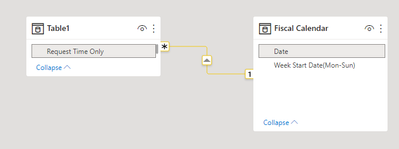
Data model:
Measure:
Raised Tickets =
CALCULATE(COUNT(Table1[Request Time Only]))Raised Tickets Last Week =
VAR maxSelectedDate =
MAX ( 'Fiscal Calendar'[Date] ) - 7
VAR minSelectedDate =
MIN ( 'Fiscal Calendar'[Date] ) - 7
RETURN
CALCULATE (
COUNT ( 'Table1'[Request Time Only] ),
FILTER (
ALL ( Table1 ),
'Table1'[Request Time Only] >= minSelectedDate
&& 'Table1'[Request Time Only] <= maxSelectedDate
)
)
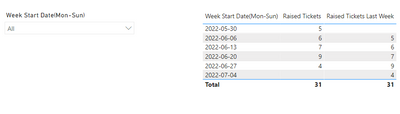
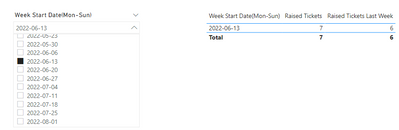
Result is as below.
Best Regards,
Rico Zhou
If this post helps, then please consider Accept it as the solution to help the other members find it more quickly.
Hi @yaman123 ,
I create a sample to have a test.
Data model:
Measure:
Raised Tickets =
CALCULATE(COUNT(Table1[Request Time Only]))Raised Tickets Last Week =
VAR maxSelectedDate =
MAX ( 'Fiscal Calendar'[Date] ) - 7
VAR minSelectedDate =
MIN ( 'Fiscal Calendar'[Date] ) - 7
RETURN
CALCULATE (
COUNT ( 'Table1'[Request Time Only] ),
FILTER (
ALL ( Table1 ),
'Table1'[Request Time Only] >= minSelectedDate
&& 'Table1'[Request Time Only] <= maxSelectedDate
)
)
Result is as below.
Best Regards,
Rico Zhou
If this post helps, then please consider Accept it as the solution to help the other members find it more quickly.
Thank you! This is working fine!
@yaman123 , Based on what I got. Closed joined with date table having columns like
new columns
Week Start date = 'Date'[Date]+-1*WEEKDAY('Date'[Date],2)+1 //Monday week
Week End date = 'Date'[Date]+ 7-1*WEEKDAY('Date'[Date],2)
Week Rank = RANKX(all('Date'),'Date'[Week Start date],,ASC,Dense)
OR
Week Rank = RANKX(all('Date'),'Date'[Year Week],,ASC,Dense) //YYYYWW format
example measures
This Week = CALCULATE(sum('Table'[Qty]), FILTER(ALL('Date'),'Date'[Week Rank]=max('Date'[Week Rank])))
Last Week = CALCULATE(sum('Table'[Qty]), FILTER(ALL('Date'),'Date'[Week Rank]=max('Date'[Week Rank])-1))
If you love stickers, then you will definitely want to check out our community sticker challenge, Barcelona edition!
Check out the July 2026 Power BI update to learn about new features.
| User | Count |
|---|---|
| 28 | |
| 28 | |
| 20 | |
| 19 | |
| 19 |
| User | Count |
|---|---|
| 35 | |
| 26 | |
| 19 | |
| 18 | |
| 17 |