Learn from the best! Meet the four finalists headed to the FINALS of the Power BI Dataviz World Championships! Register now
Hi all,
How can I achieve the following week number results?:
| Day | Date | ISO8601 | Special |
| Thursday | 31.12.2020 | 53 | 53 |
| Friday | 01.01.2021 | 53 | 1 |
| Saturday | 02.01.2021 | 53 | 1 |
| Sunday | 03.01.2021 | 53 | 1 |
| Monday | 04.01.2021 | 1 | 1 |
| Tuesday | 05.01.2021 | 1 | 1 |
| Wednesday | 06.01.2021 | 1 | 1 |
| Thursday | 07.01.2021 | 1 | 1 |
| Friday | 08.01.2021 | 1 | 1 |
| Saturday | 09.01.2021 | 1 | 1 |
| Sunday | 10.01.2021 | 1 | 1 |
| Monday | 11.01.2021 | 2 | 2 |
Looking forward to your answers.
Thanks.
Solved! Go to Solution.
Hi @Anonymous ,
You can create the calculated column like this:
ISO8601 = WEEKNUM('Table'[Date],21)
Please refer the [ISO] column in my sample file from the previous post.
Best Regards,
Community Support Team _ Yingjie Li
If this post helps, then please consider Accept it as the solution to help the other members find it more quickly.
Hi @Anonymous ,
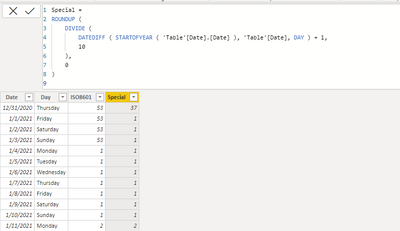
Based on your description, seems like you want to define 10 days as a week for each year, you can create a calculated column like this:
Special =
ROUNDUP (
DIVIDE (
DATEDIFF ( STARTOFYEAR ( 'Table'[Date].[Date] ), 'Table'[Date], DAY ) + 1,
10
),
0
)
Attached a sample file in the below, hopes to help you.
Best Regards,
Community Support Team _ Yingjie Li
If this post helps, then please consider Accept it as the solution to help the other members find it more quickly.
Hello,
Thank you for that.
How can I get the week numbers to calculate based on the ISO8601?:
| Day | Date | Week Number ISO8601 |
| Thursday | 31.12.2020 | 53 |
| Friday | 01.01.2021 | 53 |
| Saturday | 02.01.2021 | 53 |
| Sunday | 03.01.2021 | 53 |
| Monday | 04.01.2021 | 1 |
| Tuesday | 05.01.2021 | 1 |
| Wednesday | 06.01.2021 | 1 |
| Thursday | 07.01.2021 | 1 |
| Friday | 08.01.2021 | 1 |
| Saturday | 09.01.2021 | 1 |
| Sunday | 10.01.2021 | 1 |
| Monday | 11.01.2021 | 2 |
Looking forward to hearing back from you.
Best regards.
Hi @Anonymous ,
You can create the calculated column like this:
ISO8601 = WEEKNUM('Table'[Date],21)
Please refer the [ISO] column in my sample file from the previous post.
Best Regards,
Community Support Team _ Yingjie Li
If this post helps, then please consider Accept it as the solution to help the other members find it more quickly.
@Anonymous , there is an issue reported for that.
For 2021, try like new week column like
Week Number =
if(Year([date] = 2021 && WEEKNUM([Date],2) >=2, WEEKNUM([Date],2) -1,WEEKNUM([Date],2))
Hi Amit,
And how would it work the previous and following years?
Many thanks.
If you have recently started exploring Fabric, we'd love to hear how it's going. Your feedback can help with product improvements.
A new Power BI DataViz World Championship is coming this June! Don't miss out on submitting your entry.
Share feedback directly with Fabric product managers, participate in targeted research studies and influence the Fabric roadmap.
| User | Count |
|---|---|
| 57 | |
| 38 | |
| 33 | |
| 19 | |
| 16 |
| User | Count |
|---|---|
| 69 | |
| 67 | |
| 41 | |
| 32 | |
| 24 |