cancel
Showing results for 
Search instead for 
Did you mean: 

Did you hear? There's a new SQL AI Developer certification (DP-800). Start preparing now and be one of the first to get certified. Register now

Reply
Anonymous
Not applicable

Website not responding

Hi everyone


Trying to start a new query "from web" in excel for the following url


https://www.masters.com/en_US/scores/feeds/scores.json


but it seems to be timing out but all seems ok when I access it on the web. 


Anyone have any suggestions?


Thanks

1 ACCEPTED SOLUTION

@Anonymous ,


Based on my test, the website you want to visit has added anti-spider system, you should add an "User Agent" session in the web request statement. But unfortunately Web.Contents() doesn't support such kind of level. So power query will return timeout error.


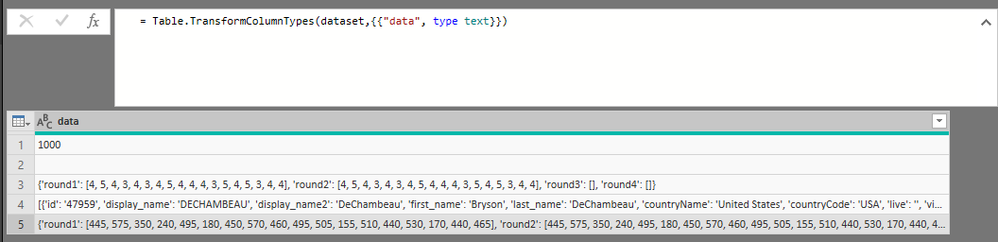
As a workaround, I would suggest you to write a simple python script instead of Web.Contents() like pattern below:

let
    Source = Table.FromRecords({[Key = 1, Value = 1]}),
    #"Run Python script" = Python.Execute("# 'dataset' holds the input data for this script#(lf)import requests#(lf)import pandas as pd#(lf)import json#(lf)headers = {'User-Agent': 'Mozilla/5.0 (Windows NT 10.0; Win64; x64) AppleWebKit/537.36 (KHTML, like Gecko) Chrome/73.0.3683.103 Safari/537.36'}#(lf)json_html = requests.get(""https://www.masters.com/en_US/scores/feeds/scores.json"", headers = headers)#(lf)dataset = pd.read_json(json_html.text)",[dataset = Source]),
    dataset = #"Run Python script"{[Name="dataset"]}[Value],
    #"Changed Type1" = Table.TransformColumnTypes(dataset,{{"data", type text}})
in
    #"Changed Type1"

Capture.PNG 

Community Support Team _ Jimmy Tao

If this post helps, then please consider Accept it as the solution to help the other members find it more quickly.


View solution in original post

2 REPLIES 2
Anonymous
Not applicable

The following code has worked in the past but it can't seem to connect to the website now and I don't have the knowledge to figure out what has changed!


Thanks


let
    Source = Json.Document(Web.Contents("https://www.masters.com/en_US/scores/feeds/scores.json")),
    data = Source[data],
    player = data[player],
    #"Converted to Table" = Table.FromList(player, Splitter.SplitByNothing(), null, null, ExtraValues.Error),
    #"Expanded Column1" = Table.ExpandRecordColumn(#"Converted to Table", "Column1", {"id", "first_name", "last_name", "pos", "teetime", "today", "thru", "topar", "r1", "r2", "r3", "r4"}, {"id", "first_name", "last_name", "pos", "teetime", "today", "thru", "topar", "r1", "r2", "r3", "r4"}),
    #"Added Custom" = Table.AddColumn(#"Expanded Column1", "Name", each [first_name]&" "&[last_name]),
    #"Removed Columns" = Table.RemoveColumns(#"Added Custom",{"first_name", "last_name"}),
    #"Reordered Columns" = Table.ReorderColumns(#"Removed Columns",{"Name", "id", "pos", "teetime", "today", "thru", "topar", "r1", "r2", "r3", "r4"})
in
    #"Reordered Columns"

@Anonymous ,


Based on my test, the website you want to visit has added anti-spider system, you should add an "User Agent" session in the web request statement. But unfortunately Web.Contents() doesn't support such kind of level. So power query will return timeout error.


As a workaround, I would suggest you to write a simple python script instead of Web.Contents() like pattern below:

let
    Source = Table.FromRecords({[Key = 1, Value = 1]}),
    #"Run Python script" = Python.Execute("# 'dataset' holds the input data for this script#(lf)import requests#(lf)import pandas as pd#(lf)import json#(lf)headers = {'User-Agent': 'Mozilla/5.0 (Windows NT 10.0; Win64; x64) AppleWebKit/537.36 (KHTML, like Gecko) Chrome/73.0.3683.103 Safari/537.36'}#(lf)json_html = requests.get(""https://www.masters.com/en_US/scores/feeds/scores.json"", headers = headers)#(lf)dataset = pd.read_json(json_html.text)",[dataset = Source]),
    dataset = #"Run Python script"{[Name="dataset"]}[Value],
    #"Changed Type1" = Table.TransformColumnTypes(dataset,{{"data", type text}})
in
    #"Changed Type1"

Capture.PNG 

Community Support Team _ Jimmy Tao

If this post helps, then please consider Accept it as the solution to help the other members find it more quickly.


Helpful resources

Announcements
April Power BI Update Carousel

Power BI Monthly Update - April 2026

Check out the April 2026 Power BI update to learn about new features.

Fabric SQL PBI Data Days

Data Days 2026 coming soon!

Sign up to receive a private message when registration opens and key events begin.

New to Fabric survey Carousel

New to Fabric Survey

If you have recently started exploring Fabric, we'd love to hear how it's going. Your feedback can help with product improvements.

Power BI DataViz World Championships carousel

Power BI DataViz World Championships - June 2026

A new Power BI DataViz World Championship is coming this June! Don't miss out on submitting your entry.