cancel
Showing results for 
Search instead for 
Did you mean: 

The Power BI Data Visualization World Championships is back! Get ahead of the game and start preparing now! Learn more

Reply
DPJay
Regular Visitor

Top N filter using parameter

Hello,


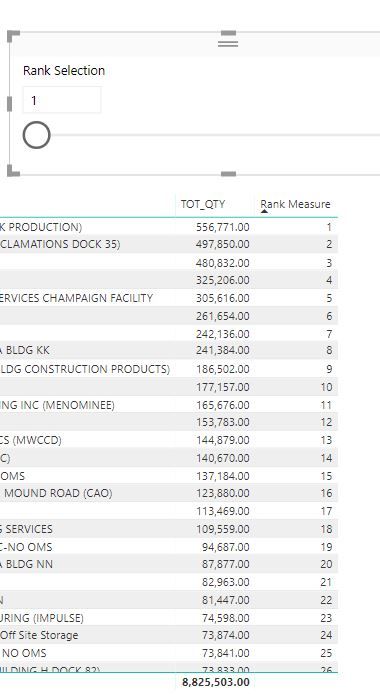
I am trying to create a top N filter based on parameter. The parameter i have created is called Rank selection but i am not able to find a way to filter my table based on the parameter.


img_1.jpg


1 ACCEPTED SOLUTION
v-yulgu-msft
Microsoft Employee
Microsoft Employee

Hi @DPJay,


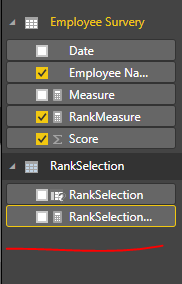
Once you created a What If parameter, a measure returns selected value will be generated automatically.

1.PNG


Create an extra measure as below. 

Measure = IF([RankMeasure]<=RankSelection[RankSelection Value],1,0)

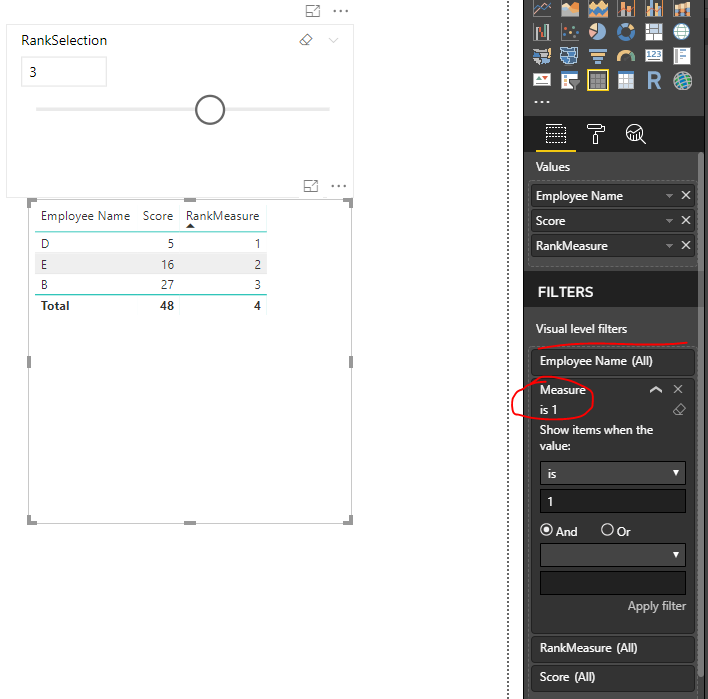
Add above new created measure into visual level filter.

2.PNG


Best regards,

Yuliana Gu

Community Support Team _ Yuliana Gu
If this post helps, then please consider Accept it as the solution to help the other members find it more quickly.

View solution in original post

4 REPLIES 4
v-yulgu-msft
Microsoft Employee
Microsoft Employee

Hi @DPJay,


Once you created a What If parameter, a measure returns selected value will be generated automatically.

1.PNG


Create an extra measure as below. 

Measure = IF([RankMeasure]<=RankSelection[RankSelection Value],1,0)

Add above new created measure into visual level filter.

2.PNG


Best regards,

Yuliana Gu

Community Support Team _ Yuliana Gu
If this post helps, then please consider Accept it as the solution to help the other members find it more quickly.
Anonymous
Not applicable

hi


i am getting some  issue implementing this


@v-yulgu-msft wrote:

Hi @DPJay,


Once you created a What If parameter, a measure returns selected value will be generated automatically.

1.PNG


Create an extra measure as below. 

Measure = IF([RankMeasure]<=RankSelection[RankSelection Value],1,0)

Add above new created measure into visual level filter.

2.PNG


Best regards,

Yuliana Gu


Thanks Yuliana..It worked Smiley Happy

RoboticPea
Regular Visitor

Hi! 

This youtube channel helped me a lot and this may be the video you are searching for: https://www.youtube.com/watch?v=SsZseKOgrWQ&index=10&list=PLDz00l_jz6zym_YP8ZW11o52niGfCP8pN 

Hope it helps! 🙂 

Helpful resources

Announcements
Power BI DataViz World Championships

Power BI Dataviz World Championships

The Power BI Data Visualization World Championships is back! Get ahead of the game and start preparing now!

December 2025 Power BI Update Carousel

Power BI Monthly Update - December 2025

Check out the December 2025 Power BI Holiday Recap!

FabCon Atlanta 2026 carousel

FabCon Atlanta 2026

Join us at FabCon Atlanta, March 16-20, for the ultimate Fabric, Power BI, AI and SQL community-led event. Save $200 with code FABCOMM.