Get certified for free when you join Fabric Data Days 2026 and dive into Fabric, Power BI, SQL, AI, and other essential data skills.
Join nowJuly 7 - July 17 | Round 2 of the Power BI Dataviz World Championships. Don't miss your chance! Learn more
Hello,
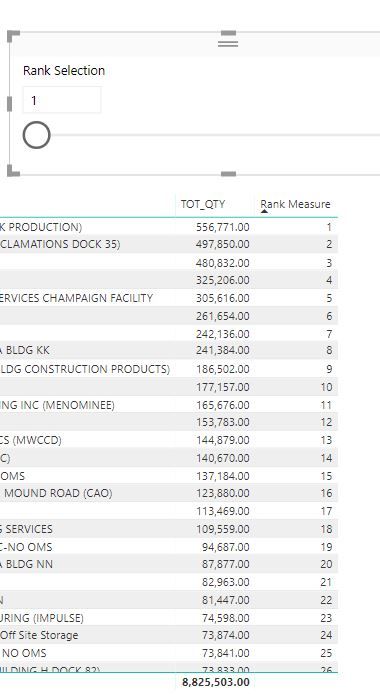
I am trying to create a top N filter based on parameter. The parameter i have created is called Rank selection but i am not able to find a way to filter my table based on the parameter.
Solved! Go to Solution.
Hi @DPJay,
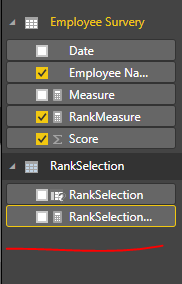
Once you created a What If parameter, a measure returns selected value will be generated automatically.
Create an extra measure as below.
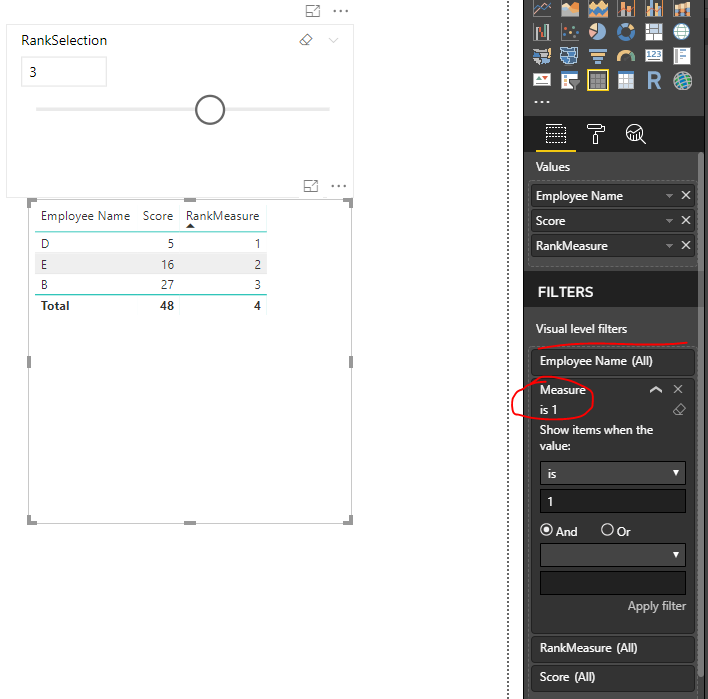
Measure = IF([RankMeasure]<=RankSelection[RankSelection Value],1,0)
Add above new created measure into visual level filter.
Best regards,
Yuliana Gu
Hi @DPJay,
Once you created a What If parameter, a measure returns selected value will be generated automatically.
Create an extra measure as below.
Measure = IF([RankMeasure]<=RankSelection[RankSelection Value],1,0)
Add above new created measure into visual level filter.
Best regards,
Yuliana Gu
hi
i am getting some issue implementing this
@v-yulgu-msft wrote:Hi @DPJay,
Once you created a What If parameter, a measure returns selected value will be generated automatically.
Create an extra measure as below.
Measure = IF([RankMeasure]<=RankSelection[RankSelection Value],1,0)Add above new created measure into visual level filter.
Best regards,
Yuliana Gu
Thanks Yuliana..It worked ![]()
Hi!
This youtube channel helped me a lot and this may be the video you are searching for: https://www.youtube.com/watch?v=SsZseKOgrWQ&index=10&list=PLDz00l_jz6zym_YP8ZW11o52niGfCP8pN
Hope it helps! 🙂
Join us in Barcelona for FabCon and SQLCon, the Fabric, Power BI, SQL, and AI community event. Save €200 with code FABCMTY200.
Join Fabric Data Days 2026: 60 days of free live/on-demand sessions, challenges, study groups, and certification opportunities.
| User | Count |
|---|---|
| 23 | |
| 19 | |
| 18 | |
| 17 | |
| 13 |
| User | Count |
|---|---|
| 60 | |
| 52 | |
| 47 | |
| 40 | |
| 38 |