Don't miss your chance to take exam DP-600 or DP-700 on us!
Request nowLearn from the best! Meet the four finalists headed to the FINALS of the Power BI Dataviz World Championships! Register now
I need some help working through an issue with trying to pull into both desktop and dataflows of a table of data behind a login and password.
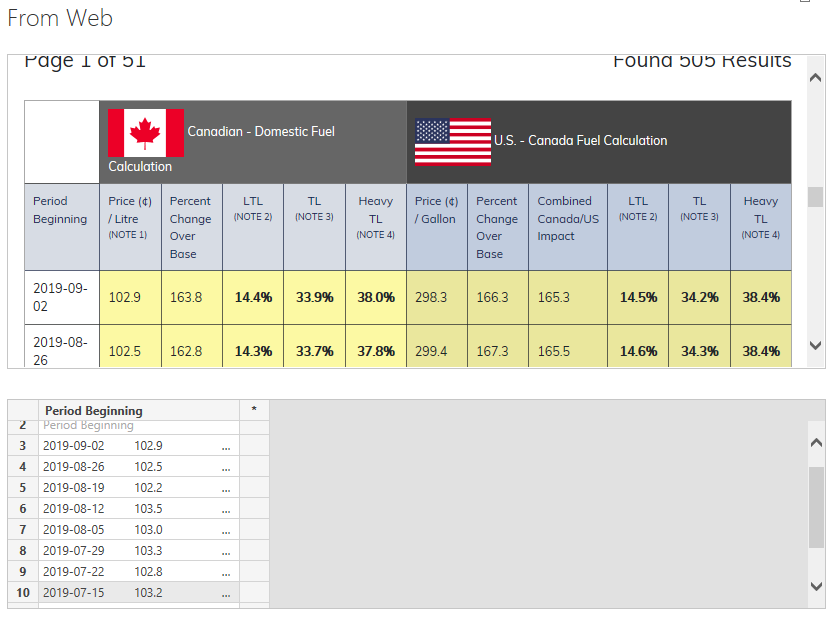
The data is coming from https://fcafuel.org/historical-fuel-index/.
The public version includes historical data, yet not the current records.
The entire historical table is only available behind the pay wall.
I want to pull this data into a dataset for a report.
Hi @Anonymous
Let me know if you'd like to get below data:
You might refer to this article:
@v-diye-msft Thanks for the suggestion.
I've already tried similar methods and run into the issues of not being able to pass/use login and password to access current values.
Instead, I run into the "Table highlighting is disabled..." error like in the thread below.
@Anonymous
I tried to extract data form a website which required credentials and failed dismally. I eventually succeeded with a long workaround using Excel.
If you're interested, you can see how in this thread:
Get data from web with credentials
Proud to be a Super User!
Paul on Linkedin.
@Anonymous
Good luck! (btw, you still need the credentials to get into the dataset- the solution in the thread only solves the problem of getting access to the dataset going through the login requirements; it does not provide a back-entry avoiding login...)
EDIT: I just did a search for a solution using Python and came across this:
Scraping data from web which requires login using Python
Proud to be a Super User!
Paul on Linkedin.
| User | Count |
|---|---|
| 50 | |
| 40 | |
| 32 | |
| 14 | |
| 13 |
| User | Count |
|---|---|
| 87 | |
| 73 | |
| 37 | |
| 28 | |
| 26 |