Join us at FabCon Atlanta from March 16 - 20, 2026, for the ultimate Fabric, Power BI, AI and SQL community-led event. Save $200 with code FABCOMM.
Register now!Learn from the best! Meet the four finalists headed to the FINALS of the Power BI Dataviz World Championships! Register now
Hello,
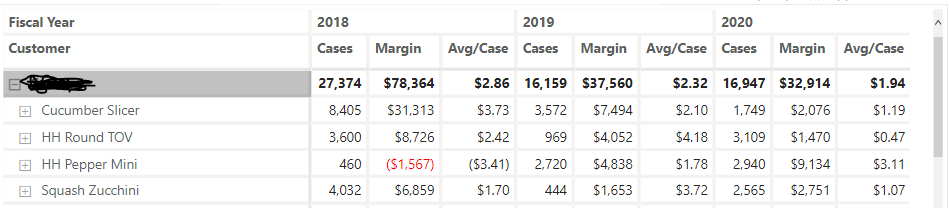
I have a matrix that I am trying to change to meet a particular format. What I would like is to show:
Cases
18/19/20
Then
Margin
18/19/20
then Avg/Case
18/19/20
Is there a way to adjust this?
Solved! Go to Solution.
Hello @Anonymous
This is not currently available although there is at least one submitted idea for it that you can vote for.
The workaround is to create filtered measures so you would have three measures for each group and you would add each to the matrix in the order you wanted.
2018 Cases = CALCULATE ( [Cases], KEEPFILTERS ( Dates[Fiscal Year] = 2018 ) )2019 Cases = CALCULATE ( [Cases], KEEPFILTERS ( Dates[Fiscal Year] = 2019 ) )2020 Cases = CALCULATE ( [Cases], KEEPFILTERS ( Dates[Fiscal Year] = 2020 ) )
etc.
Not ideal but it will work.
Hello @Anonymous
This is not currently available although there is at least one submitted idea for it that you can vote for.
The workaround is to create filtered measures so you would have three measures for each group and you would add each to the matrix in the order you wanted.
2018 Cases = CALCULATE ( [Cases], KEEPFILTERS ( Dates[Fiscal Year] = 2018 ) )2019 Cases = CALCULATE ( [Cases], KEEPFILTERS ( Dates[Fiscal Year] = 2019 ) )2020 Cases = CALCULATE ( [Cases], KEEPFILTERS ( Dates[Fiscal Year] = 2020 ) )
etc.
Not ideal but it will work.
Share feedback directly with Fabric product managers, participate in targeted research studies and influence the Fabric roadmap.
Check out the February 2026 Power BI update to learn about new features.
| User | Count |
|---|---|
| 52 | |
| 51 | |
| 39 | |
| 15 | |
| 14 |
| User | Count |
|---|---|
| 93 | |
| 82 | |
| 34 | |
| 29 | |
| 25 |