Join us at FabCon Atlanta from March 16 - 20, 2026, for the ultimate Fabric, Power BI, AI and SQL community-led event. Save $200 with code FABCOMM.
Register now!Vote for your favorite vizzies from the Power BI Dataviz World Championship submissions. Vote now!
Hi all,
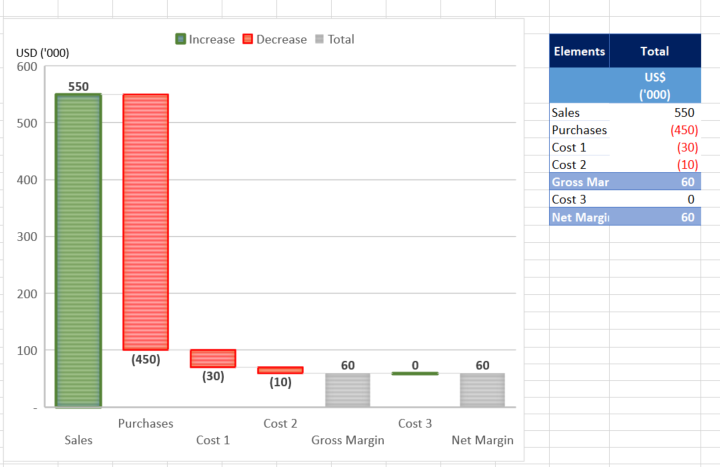
From the Tutorial, the waterfall graph can present the changes over time. But I did something else in excel as below as try to replicate it in Power BI but in vain.
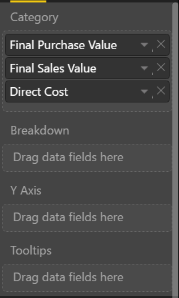
Below, i am showing the breakdown by elements. For those elements, they are different attributes (fields) in the database. Not sure how to put the fields into the visualisation panel (Category, Breakdown, Y Axis).
Solved! Go to Solution.
@JeffreyLau wrote:
Hi all,
From the Tutorial, the waterfall graph can present the changes over time. But I did something else in excel as below as try to replicate it in Power BI but in vain.
Below, i am showing the breakdown by elements. For those elements, they are different attributes (fields) in the database. Not sure how to put the fields into the visualisation panel (Category, Breakdown, Y Axis).
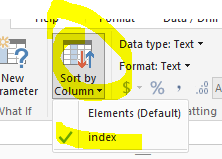
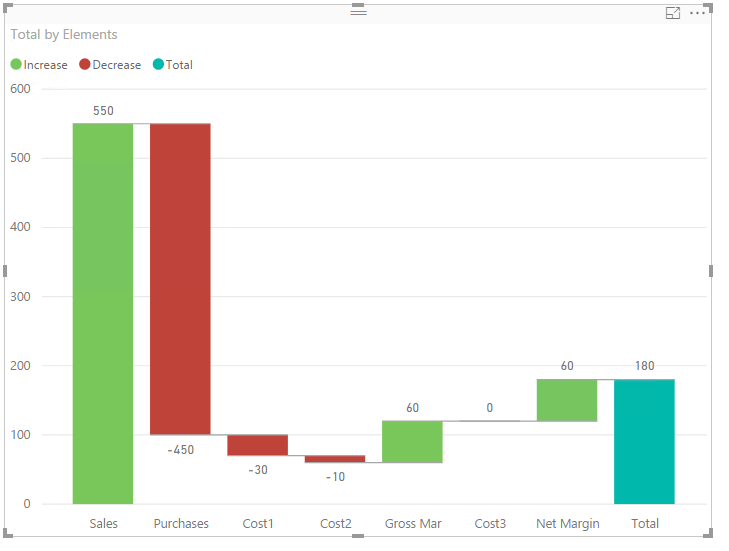
AFAIK, it is not able to create the very equivalent waterfall graph in Power BI. One similar graph as below can be created, however the elements have to be assigned an index to determine the present order in the graph. See more details in the attached pbix file.
@JeffreyLau wrote:
Hi all,
From the Tutorial, the waterfall graph can present the changes over time. But I did something else in excel as below as try to replicate it in Power BI but in vain.
Below, i am showing the breakdown by elements. For those elements, they are different attributes (fields) in the database. Not sure how to put the fields into the visualisation panel (Category, Breakdown, Y Axis).
AFAIK, it is not able to create the very equivalent waterfall graph in Power BI. One similar graph as below can be created, however the elements have to be assigned an index to determine the present order in the graph. See more details in the attached pbix file.
Vote for your favorite vizzies from the Power BI World Championship submissions!
If you love stickers, then you will definitely want to check out our Community Sticker Challenge!
Check out the January 2026 Power BI update to learn about new features.
| User | Count |
|---|---|
| 63 | |
| 51 | |
| 41 | |
| 23 | |
| 18 |
| User | Count |
|---|---|
| 124 | |
| 109 | |
| 47 | |
| 28 | |
| 27 |