Don't miss your chance to take exam DP-600 or DP-700 on us!
Request nowLearn from the best! Meet the four finalists headed to the FINALS of the Power BI Dataviz World Championships! Register now
I want to build a waterfall chart that shows how / why cost increased over time from one month to the next. For now I'm looking at two periods: Last Month and This Month.
What I'd like is this:
One bar representing Cost Per Piece for Prior Month
Three bars in between breaking down increases / decreases in Freight, Fuel, and Other Charges
Then a second large bar represetning Cost Per Piece for Current Month.
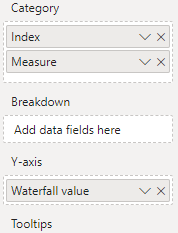
The answer in this thread was very helpful. I've created a table with my measures / index (representing freight, fuel, and other).
https://community.powerbi.com/t5/Desktop/Waterfall-Chart-using-multiple-measures/m-p/439275
What I've got is this:
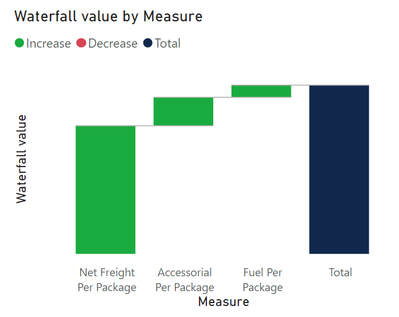
How can I update this so I see one large bar representing total cost for the prior month and one large bar representing total cost for the current month with the incremental steps in between showing the changes in freight, fuel, and accessorial that drove the difference between the two? For what it's worth, I have measures built to show each of these values for both the current and prior month and I have measures to show the difference between them as well.
Solved! Go to Solution.
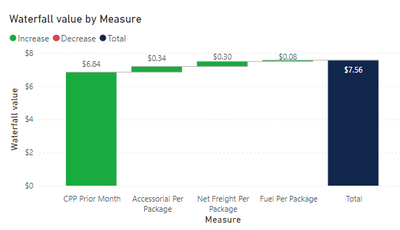
Okay, I figured it out. Solution below for posterity:
It looks like this:
Doesn't sound like a waterfall chart is the right vehicle for the story you are trying to tell. Have you considered using other visuals?
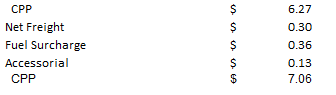
I've done something similar in Excel that I'm trying to emulate.
It looks like this:
And uses these values:
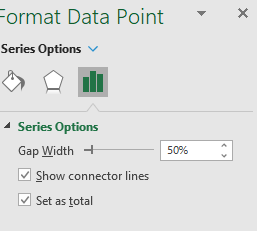
I set the second CPP as total in the series options:
I just want to emualte exactly this in Power BI if at all possible.
Okay, I figured it out. Solution below for posterity:
It looks like this:
Hi Bensiqc,
Can you share how you build the "Waterfall Value" measure to use: CPP Prior Month (total), Net Freight Delta, Fuel Delta, Accessorial Delta?
I want to build similar waterfall chart but I do not know what measures to create in order to achieve this.
Thanks, Doris
Here's what I have.
My waterfall measure is written this way:
| Measure | Index |
| CPP Prior Month | 1 |
| Net Freight Per Package Current vs Prior | 2 |
| Fuel Per Package Current Vs Prior | 3 |
| Accessorial Per Package Current Vs Prior | 4 |
| CPP Current Month | 5 |
Share feedback directly with Fabric product managers, participate in targeted research studies and influence the Fabric roadmap.
Check out the February 2026 Power BI update to learn about new features.
| User | Count |
|---|---|
| 51 | |
| 40 | |
| 37 | |
| 14 | |
| 14 |
| User | Count |
|---|---|
| 84 | |
| 69 | |
| 38 | |
| 29 | |
| 27 |