cancel
Showing results for 
Search instead for 
Did you mean: 

We've captured the moments from FabCon & SQLCon that everyone is talking about, and we are bringing them to the community, live and on-demand. Starts on April 14th. Register now

Reply
bensiqc
Helper I
Helper I

Waterfall Chart - Current vs. Prior

I want to build a waterfall chart that shows how / why cost increased over time from one month to the next. For now I'm looking at two periods: Last Month and This Month.


What I'd like is this:


One bar representing Cost Per Piece for Prior Month

Three bars in between breaking down increases / decreases in Freight, Fuel, and Other Charges

Then a second large bar represetning Cost Per Piece for Current Month.


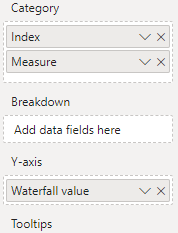
The answer in this thread was very helpful. I've created a table with my measures / index (representing freight, fuel, and other).

https://community.powerbi.com/t5/Desktop/Waterfall-Chart-using-multiple-measures/m-p/439275


What I've got is this:
 

bensiqc_0-1670020033783.png


bensiqc_1-1670020047410.png


How can I update this so I see one large bar representing total cost for the prior month and one large bar representing total cost for the current month with the incremental steps in between showing the changes in freight, fuel, and accessorial that drove the difference between the two? For what it's worth, I have measures built to show each of these values for both the current and prior month and I have measures to show the difference between them as well.

1 ACCEPTED SOLUTION

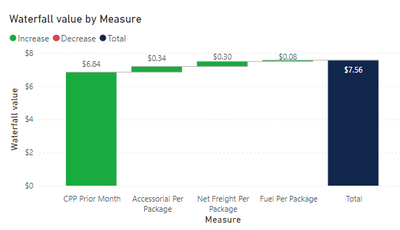
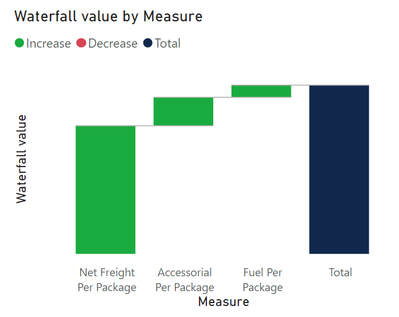
Okay, I figured it out. Solution below for posterity:


  • Built measures for the delta between current and prior month
  • Updated my "Waterfall Value" measure to use: CPP Prior Month (total), Net Freight Delta, Fuel Delta, Accessorial Delta
  • Added a total column which reprents the curent month


It looks like this:


bensiqc_5-1670347157243.png


View solution in original post

5 REPLIES 5
lbendlin
Super User
Super User

Doesn't sound like a waterfall chart is the right vehicle for the story you are trying to tell. Have you considered using other visuals?

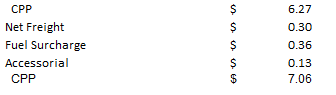
I've done something similar in Excel that I'm trying to emulate.


It looks like this:

bensiqc_2-1670346770455.png


And uses these values:

bensiqc_3-1670346779803.png


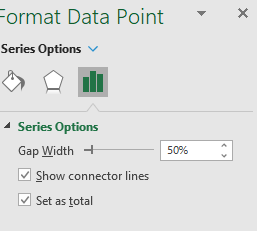
I set the second CPP as total in the series options:

bensiqc_4-1670346798198.png


I just want to emualte exactly this in Power BI if at all possible.


Okay, I figured it out. Solution below for posterity:


  • Built measures for the delta between current and prior month
  • Updated my "Waterfall Value" measure to use: CPP Prior Month (total), Net Freight Delta, Fuel Delta, Accessorial Delta
  • Added a total column which reprents the curent month


It looks like this:


bensiqc_5-1670347157243.png


Anonymous
Not applicable

Hi Bensiqc,


Can you share how you build the "Waterfall Value" measure to use: CPP Prior Month (total), Net Freight Delta, Fuel Delta, Accessorial Delta?

I want to build similar waterfall chart but I do not know what measures to create in order to achieve this.


Thanks, Doris


Here's what I have.


My waterfall measure is written this way:

 
bensiqc_0-1673370271779.png


And I have a separate sheet where I add the index for those that looks like this:
MeasureIndex
CPP Prior Month1
Net Freight Per Package Current vs Prior2
Fuel Per Package Current Vs Prior3
Accessorial Per Package Current Vs Prior4
CPP Current Month5
 
Hopefully this helps. 
 
Each of the measures referenced in the table (fuel per package current vs prior, etc.) were also created and added by me individually.

Helpful resources

Announcements
New to Fabric survey Carousel

New to Fabric Survey

If you have recently started exploring Fabric, we'd love to hear how it's going. Your feedback can help with product improvements.

Power BI DataViz World Championships carousel

Power BI DataViz World Championships - June 2026

A new Power BI DataViz World Championship is coming this June! Don't miss out on submitting your entry.

Join our Fabric User Panel

Join our Fabric User Panel

Share feedback directly with Fabric product managers, participate in targeted research studies and influence the Fabric roadmap.

March Power BI Update Carousel

Power BI Community Update - March 2026

Check out the March 2026 Power BI update to learn about new features.