Get Fabric or SQL Certified for Free.
Get certified for free when you join Fabric Data Days 2026 and dive into Fabric, Power BI, SQL, AI, and other essential data skills.
Join now- Power BI forums
- Get Help with Power BI
- Desktop
- Service
- Report Server
- Power Query
- Mobile Apps
- Developer
- DAX Commands and Tips
- Custom Visuals Development Discussion
- Health and Life Sciences
- Power BI Spanish forums
- Translated Spanish Desktop
- Training and Consulting
- Instructor Led Training
- Dashboard in a Day for Women, by Women
- Galleries
- Data Stories Gallery
- Themes Gallery
- Contests Gallery
- QuickViz Gallery
- Quick Measures Gallery
- Visual Calculations Gallery
- Notebook Gallery
- Translytical Task Flow Gallery
- TMDL Gallery
- R Script Showcase
- Webinars and Video Gallery
- Ideas
- Custom Visuals Ideas (read-only)
- Issues
- Issues
- Events
- Upcoming Events
Data Days is here! Join us now for 60+ days of learning, challenges, and connection. Learn more
- Power BI forums
- Forums
- Get Help with Power BI
- Desktop
- Re: Volume calculation
- Subscribe to RSS Feed
- Mark Topic as New
- Mark Topic as Read
- Float this Topic for Current User
- Bookmark
- Subscribe
- Printer Friendly Page

- Mark as New
- Bookmark
- Subscribe
- Mute
- Subscribe to RSS Feed
- Permalink
- Report Inappropriate Content
Volume Calculation
Hi PBI Fox,
I'm struggling to find a solution on how to solve my problem. Can someone help me how to fix it?
I want to get the diff. between each month by category and by meter name. Below is the table.
DATASET.
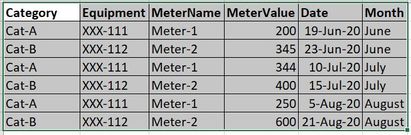
Below, is the report I want to achieve.

Your timely response is highly needed.
Regards,
Jhay
Solved! Go to Solution.


- Mark as New
- Bookmark
- Subscribe
- Mute
- Subscribe to RSS Feed
- Permalink
- Report Inappropriate Content
Hi @Anonymous ,
You may create a measure like DAX below to get diff value per month. While it won't achieve your requirement for the layout of Matrix visual completely, you may try to put [Equipment]and [MeterName] into Rows box of Matrix, put [Category] into Columns box, put [Month] and [Diff Value per month] into Values box.
Diff Value per month =
VAR _PreMonth =
    CALCULATE (
        SUM ( Table1[MeterValue] ),
        FILTER (
            ALLEXCEPT ( Table1, [Category], [Equipment], [MeterName] ),
            YEAR ( Table1[Date] ) = YEAR ( MAX ( Table1[Date] ) )
                && MONTH ( Table1[Date] )
                    = MONTH ( MAX ( Table1[Date] ) ) - 1
        )
    )
VAR _CurMonth =
    CALCULATE (
        SUM ( Table1[MeterValue] ),
        FILTER (
            ALLEXCEPT ( Table1, [Category], [Equipment], [MeterName] ),
            YEAR ( Table1[Date] ) = YEAR ( MAX ( Table1[Date] ) )
                && MONTH ( Table1[Date] ) = MONTH ( MAX ( Table1[Date] ) )
        )
    )
RETURN
    _CurMonth - _PreMonth
Best Regards,
Amy
Community Support Team _ Amy
If this post helps, then please consider Accept it as the solution to help the other members find it more quickly.
- Mark as New
- Bookmark
- Subscribe
- Mute
- Subscribe to RSS Feed
- Permalink
- Report Inappropriate Content
Hi @Anonymous ,
You may create a measure like DAX below to get diff value per month. While it won't achieve your requirement for the layout of Matrix visual completely, you may try to put [Equipment]and [MeterName] into Rows box of Matrix, put [Category] into Columns box, put [Month] and [Diff Value per month] into Values box.
Diff Value per month =
VAR _PreMonth =
    CALCULATE (
        SUM ( Table1[MeterValue] ),
        FILTER (
            ALLEXCEPT ( Table1, [Category], [Equipment], [MeterName] ),
            YEAR ( Table1[Date] ) = YEAR ( MAX ( Table1[Date] ) )
                && MONTH ( Table1[Date] )
                    = MONTH ( MAX ( Table1[Date] ) ) - 1
        )
    )
VAR _CurMonth =
    CALCULATE (
        SUM ( Table1[MeterValue] ),
        FILTER (
            ALLEXCEPT ( Table1, [Category], [Equipment], [MeterName] ),
            YEAR ( Table1[Date] ) = YEAR ( MAX ( Table1[Date] ) )
                && MONTH ( Table1[Date] ) = MONTH ( MAX ( Table1[Date] ) )
        )
    )
RETURN
    _CurMonth - _PreMonth
Best Regards,
Amy
Community Support Team _ Amy
If this post helps, then please consider Accept it as the solution to help the other members find it more quickly.
- Mark as New
- Bookmark
- Subscribe
- Mute
- Subscribe to RSS Feed
- Permalink
- Report Inappropriate Content
Hi Team,
I tried it but still it didn't work, I really don't know why? 😭 I am just 2 weeks in the learning process of PBI, so please have a forbearance on me 😢. Can anyone guide me on how to do it, I am begging please? Thanks.
Regards,
Jhay
- Mark as New
- Bookmark
- Subscribe
- Mute
- Subscribe to RSS Feed
- Permalink
- Report Inappropriate Content
Hi @Anonymous ,
It is impossible to achieve the layout completely as you showed in original Post above, so you may try the method which I have suggested, create the measure, then put related fields into Rows , Columns and Values box of Matrix visual.
Best Regards,
Amy
Community Support Team _ Amy
If this post helps, then please consider Accept it as the solution to help the other members find it more quickly.


- Mark as New
- Bookmark
- Subscribe
- Mute
- Subscribe to RSS Feed
- Permalink
- Report Inappropriate Content
@Anonymous See my article on Mean Time Between Failure (MTBF) which uses EARLIER: http://community.powerbi.com/t5/Community-Blog/Mean-Time-Between-Failure-MTBF-and-Power-BI/ba-p/3395....
The basic pattern is:
Column =
VAR __Current = [Value]
VAR __PreviousDate = MAXX(FILTER('Table','Table'[Date] < EARLIER('Table'[Date])),[Date])
VAR __Previous = MAXX(FILTER('Table',[Date]=__PreviousDate),[Value])
RETURN
__Current - __Previous
Follow on LinkedIn
@ me in replies or I'll lose your thread!!!
Instead of a Kudo, please vote for this idea
Become an expert!: Enterprise DNA
External Tools: MSHGQM
YouTube Channel!: Microsoft Hates Greg
Latest book!: DAX For Humans
DAX is easy, CALCULATE makes DAX hard...


- Mark as New
- Bookmark
- Subscribe
- Mute
- Subscribe to RSS Feed
- Permalink
- Report Inappropriate Content
@Anonymous , you can use time intelligence with date table for that
example
MTD Sales = CALCULATE(SUM(Sales[Sales Amount]),DATESMTD('Date'[Date]))
last MTD Sales = CALCULATE(SUM(Sales[Sales Amount]),DATESMTD(dateadd('Date'[Date],-1,MONTH)))
last month Sales = CALCULATE(SUM(Sales[Sales Amount]),previousmonth('Date'[Date]))
last MTD (complete) Sales =  CALCULATE(SUM(Sales[Sales Amount]),DATESMTD(ENDOFMONTH(dateadd('Date'[Date],-1,MONTH))))
previous month value =  CALCULATE(sum('table'[total hours value]),previousmonth('Date'[Date]))

diff = [MTD Sales]-[last MTD Sales]
diff % = divide([MTD Sales]-[last MTD Sales],[last MTD Sales])
To get the best of the time intelligence function. Make sure you have a date calendar and it has been marked as the date in model view. Also, join it with the date column of your fact/s. Refer :
https://radacad.com/creating-calendar-table-in-power-bi-using-dax-functions
https://www.archerpoint.com/blog/Posts/creating-date-table-power-bi
https://www.sqlbi.com/articles/creating-a-simple-date-table-in-dax/
See if my webinar on Time Intelligence can help: https://community.powerbi.com/t5/Webinars-and-Video-Gallery/PowerBI-Time-Intelligence-Calendar-WTD-Y...
Appreciate your Kudos.
- Mark as New
- Bookmark
- Subscribe
- Mute
- Subscribe to RSS Feed
- Permalink
- Report Inappropriate Content
Hi, I tried it but it didn't work. 😢
Helpful resources

Fabric Data Days 2026
Don't miss out on Data Days, June 15 through August 7. Learn Fabric, Power BI, SQL, AI and more.

Power BI Monthly Update - May 2026
Check out the May 2026 Power BI update to learn about new features.

Power BI DataViz World Championships - June 2026
A new Power BI DataViz World Championship is coming this June! Don't miss out on submitting your entry.

| User | Count |
|---|---|
| 23 | |
| 23 | |
| 21 | |
| 20 | |
| 15 |


| User | Count |
|---|---|
| 58 | |
| 54 | |
| 42 | |
| 30 | |
| 24 |


