Hi @Novice_ ,
Final showing like below:
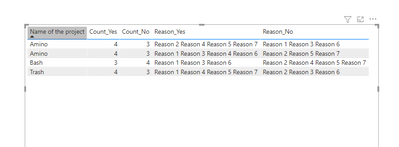
Use the following dax to create new column:
Count_Yes =
VAR test1 =
    IF ( 'Table'[Reason 1] = "Yes", 1, 0 )
VAR test2 =
    IF ( 'Table'[Reason 2] = "Yes", 1, 0 )
VAR test3 =
    IF ( 'Table'[Reason 3] = "Yes", 1, 0 )
VAR test4 =
    IF ( 'Table'[Reason 4] = "Yes", 1, 0 )
VAR test5 =
    IF ( 'Table'[Reason 5] = "Yes", 1, 0 )
VAR test6 =
    IF ( 'Table'[Reason 6] = "Yes", 1, 0 )
VAR test7 =
    IF ( 'Table'[Reason 7] = "Yes", 1, 0 )
RETURN
    test1 + test2 + test3 + test4 + test5 + + test6 + test7
Count_No =
VAR test1 =
    IF ( 'Table'[Reason 1] = "No", 1, 0 )
VAR test2 =
    IF ( 'Table'[Reason 2] = "No", 1, 0 )
VAR test3 =
    IF ( 'Table'[Reason 3] = "No", 1, 0 )
VAR test4 =
    IF ( 'Table'[Reason 4] = "No", 1, 0 )
VAR test5 =
    IF ( 'Table'[Reason 5] = "No", 1, 0 )
VAR test6 =
    IF ( 'Table'[Reason 6] = "No", 1, 0 )
VAR test7 =
    IF ( 'Table'[Reason 7] = "No", 1, 0 )
RETURN
    test1 + test2 + test3 + test4 + test5 + + test6 + test7
Count_No =
VAR test1 =
    IF ( 'Table'[Reason 1] = "No", 1, 0 )
VAR test2 =
    IF ( 'Table'[Reason 2] = "No", 1, 0 )
VAR test3 =
    IF ( 'Table'[Reason 3] = "No", 1, 0 )
VAR test4 =
    IF ( 'Table'[Reason 4] = "No", 1, 0 )
VAR test5 =
    IF ( 'Table'[Reason 5] = "No", 1, 0 )
VAR test6 =
    IF ( 'Table'[Reason 6] = "No", 1, 0 )
VAR test7 =
    IF ( 'Table'[Reason 7] = "No", 1, 0 )
RETURN
    test1 + test2 + test3 + test4 + test5 + + test6 + test7
Reason_No =
VAR test1 =
    IF ( 'Table'[Reason 1] = "No", "Reason 1", BLANK() )
VAR test2 =
    IF ( 'Table'[Reason 2] = "No", "Reason 2", BLANK() )
VAR test3 =
    IF ( 'Table'[Reason 3] = "No", "Reason 3", BLANK() )
VAR test4 =
    IF ( 'Table'[Reason 4] = "No","Reason 4", BLANK() )
VAR test5 =
    IF ( 'Table'[Reason 5] = "No", "Reason 5", BLANK() )
VAR test6 =
    IF ( 'Table'[Reason 6] = "No", "Reason 6", BLANK())
VAR test7 =
    IF ( 'Table'[Reason 7] = "No", "Reason 7", BLANK())
RETURN
    test1&" "&test2&" "&test3&" "&test4&" "&test5&" "&test6&" "&test7
You could download my pbix flie if you need.
Wish it is helpful for you!
Best Regards
Lucien


