cancel
Showing results for 
Search instead for 
Did you mean: 

Try your skills in the Power BI Dataviz World Championship! Round one ends June 26. Join now

Reply
TheBigFrench
Regular Visitor

Visualize links between data

Hi,

How can visualize the link between data, in a single table.

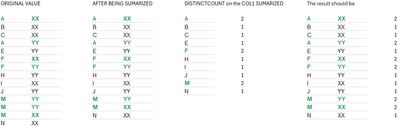
Here is a very simple example  :

COL1COL2
AXX
BXX
CXX
AYY
EYY
FXX
FYY
HYY
IXX
JYY
MYY
MYY
MXX
NXX


In this exemple, the cells in bold and green are common between YY and XX.

What type of visualise (or calculation two), can I use to only see the value in common ?

I tries to used the "forced directed graph" (from Microsoft), but I don't know how to filter value in common only (so the graph is unreadable).

The value are not that, but my table is realy like that, with millions of lines, but with only few in common, I want to visualize.

Thanks for your help and advices

1 ACCEPTED SOLUTION
Daniel29195
Community Champion
Community Champion

@TheBigFrench 

Daniel29195_1-1706300897729.png


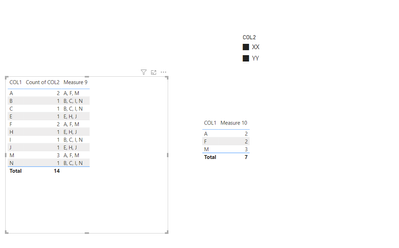
the one on the right,  when you selected from slicer, xx  and yy , it will filter out and leave only the values that have xx and yy in comon . 

Measure 10 =
var filters = countrows(ALLSELECTED(table31[COL2]))
var datasource =
filter(
ADDCOLUMNS(
    SUMMARIZE(
        table31,
        table31[COL1]
    ),
    "@x" ,  CALCULATE(DISTINCTCOUNT(table31[COL2]))
),
[@x] = filters
)

RETURN
    CALCULATE(
        COUNTROWS(table31),
        KEEPFILTERS(datasource)
    )


## -############

## -############

## -############


the one on the left , will show which values have common data from the other column .  ( not affected by slicer) (this is somewhat complex ) 

Measure 9 =
var datasource =
ADDCOLUMNS(
    ALLSELECTED(table31[COL1]),
    "@concat"  ,
    CALCULATE(
        CONCATENATEX(
            WINDOW(
                0,
                ABS,
                -1,
                ABS,
                SUMMARIZE(
                    table31,
                    table31[COL1],
                    table31[COL2])
                    ,ORDERBY(table31[COL2] ,  asc )
            ),
            table31[COL2], ","
        )
    )
)

var selected_current_filter_context =  SELECTEDVALUE(table31[COL1])

var current_row_data =
SELECTCOLUMNS(
FILTER(
    datasource,
    table31[COL1] = selected_current_filter_context
),
[@concat]
)

var result =
FILTER(
    datasource,
    [@concat] = current_row_data
)

RETURN CONCATENATEX(result, table31[COL1] , ", " )


If my response has successfully addressed your issue kindly consider marking it as the accepted solution! This will help others find it quickly. I would appreciate hitting that kudos button 👍🤠


View solution in original post

4 REPLIES 4
Daniel29195
Community Champion
Community Champion

@TheBigFrench 

Daniel29195_1-1706300897729.png


the one on the right,  when you selected from slicer, xx  and yy , it will filter out and leave only the values that have xx and yy in comon . 

Measure 10 =
var filters = countrows(ALLSELECTED(table31[COL2]))
var datasource =
filter(
ADDCOLUMNS(
    SUMMARIZE(
        table31,
        table31[COL1]
    ),
    "@x" ,  CALCULATE(DISTINCTCOUNT(table31[COL2]))
),
[@x] = filters
)

RETURN
    CALCULATE(
        COUNTROWS(table31),
        KEEPFILTERS(datasource)
    )


## -############

## -############

## -############


the one on the left , will show which values have common data from the other column .  ( not affected by slicer) (this is somewhat complex ) 

Measure 9 =
var datasource =
ADDCOLUMNS(
    ALLSELECTED(table31[COL1]),
    "@concat"  ,
    CALCULATE(
        CONCATENATEX(
            WINDOW(
                0,
                ABS,
                -1,
                ABS,
                SUMMARIZE(
                    table31,
                    table31[COL1],
                    table31[COL2])
                    ,ORDERBY(table31[COL2] ,  asc )
            ),
            table31[COL2], ","
        )
    )
)

var selected_current_filter_context =  SELECTEDVALUE(table31[COL1])

var current_row_data =
SELECTCOLUMNS(
FILTER(
    datasource,
    table31[COL1] = selected_current_filter_context
),
[@concat]
)

var result =
FILTER(
    datasource,
    [@concat] = current_row_data
)

RETURN CONCATENATEX(result, table31[COL1] , ", " )


If my response has successfully addressed your issue kindly consider marking it as the accepted solution! This will help others find it quickly. I would appreciate hitting that kudos button 👍🤠


TheBigFrench
Regular Visitor

I tried creating a table (with two formulas : , with the agregation and the count (STEP 3 above), but on STEP 4, it is always filtered by the row context : 

NewTable = DISTINCT('OrigineTable'[col1]
And 
Totals =
   SUMX(
      VALUES('OrigineTable'[col1]),
      CALCULATE(COUNT('OrigineTable'[col2]))
   )
 
But when I use the Totals in NEWTable linked with OrigineTable (on col1), it won't work, because of the row context !
TheBigFrench
Regular Visitor

Hi @Greg_Deckler ,

Thanks for your proposition. It is not working, probably because of the line context. But it may me think of an other way : how can I exclude the row context from the calculation.

I am thinking of using the DISTINCT on COL1, after being SUMMERIZED with your formula. Something like that, steps by steps : 

TheBigFrench_0-1706181352612.png


Thanks for your help.

Regards,


Greg_Deckler
Community Champion
Community Champion

@TheBigFrench Well, you could create a measure that you can filter on. Something as simple as:

Common = COUNTROWS(SUMMARIZE('Table', [COL1], [COL2]))

You could then filter for when Common = 2


Follow on LinkedIn
@ me in replies or I'll lose your thread!!!
Instead of a Kudo, please vote for this idea
Become an expert!: Enterprise DNA
External Tools: MSHGQM
YouTube Channel!: Microsoft Hates Greg
Latest book!:
DAX For Humans

DAX is easy, CALCULATE makes DAX hard...

Helpful resources

Announcements
Fabric Data Days is here Carousel

Fabric Data Days 2026

Don't miss out on Data Days, June 15 through August 7. Learn Fabric, Power BI, SQL, AI and more.

May Power BI Update Carousel

Power BI Monthly Update - May 2026

Check out the May 2026 Power BI update to learn about new features.

Power BI DataViz World Championships carousel

Power BI DataViz World Championships - June 2026

A new Power BI DataViz World Championship is coming this June! Don't miss out on submitting your entry.