Join us at FabCon Atlanta from March 16 - 20, 2026, for the ultimate Fabric, Power BI, AI and SQL community-led event. Save $200 with code FABCOMM.
Register now!The Power BI Data Visualization World Championships is back! Get ahead of the game and start preparing now! Learn more
Hello everyone,
I already seen before this question but I never had and answer about it.
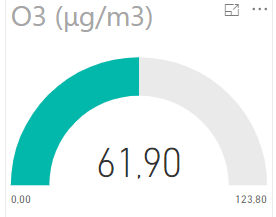
So there is my problem I have some data that I want to display in a gauge but when I do it the gauge show to me the sum or the max of the data. I don't know how to get the last value in my table.
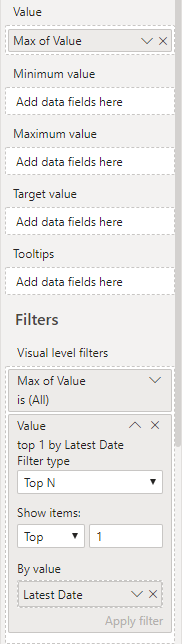
I tried to correct this problem by adding a filter with top N and by the value the latest date but when I do that I have the lastest value but the max value isn't right I just getting the double of the value
Can you help me please?
Thank you in advance!
Solved! Go to Solution.
Apologies. This is what I get just typing formulas into the forum instead of checking the syntax. Wrapping it in a FILTER should fix that issue:
LatestValue = CALCULATE( SELECTEDVALUE(Table1[Value]), FILTER(Table1, Table1[Date] = MAX(Table1[Date])) )
What do you want the max value of the gauge to be? PowerBI assumes double the current amount if no value is given.
Thank you for your reply,
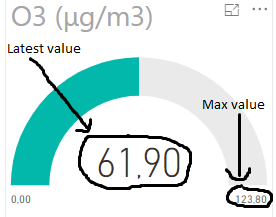
I want the latest value in my table which is display on the enter of the gauge and I want also the max value display and not the double of my latest value
See below the position:
Ahh, looks like you need to create your own measure here.
First thing I would do would be to remove your visual level filter that's only pulling the Top 1 value by latest date. Then set the max of your gauge to the max of Value.
Then to get today's value for the position of the gauge, we create a measure like so:
LatestValue = CALCULATE( SELECTEDVALUE(Table1[Value]), Table1[Date] = MAX(Table1[Date]) )
Drop that into your visualization bucket and you're good to go.
tHANKS FOR YOUR REPLY?
I have an error when I copy paste your function I replace the nam of the table but when I replace Table1[Date] Powr BI say that the function MAX is used in a true/false expression and can't be used for the table filter
Apologies. This is what I get just typing formulas into the forum instead of checking the syntax. Wrapping it in a FILTER should fix that issue:
LatestValue = CALCULATE( SELECTEDVALUE(Table1[Value]), FILTER(Table1, Table1[Date] = MAX(Table1[Date])) )
The Power BI Data Visualization World Championships is back! Get ahead of the game and start preparing now!
Check out the November 2025 Power BI update to learn about new features.
| User | Count |
|---|---|
| 59 | |
| 46 | |
| 42 | |
| 23 | |
| 18 |
| User | Count |
|---|---|
| 193 | |
| 123 | |
| 99 | |
| 67 | |
| 49 |