cancel
Showing results for 
Search instead for 
Did you mean: 

Next up in the FabCon + SQLCon recap series: The roadmap for Microsoft SQL and Maximizing Developer experiences in Fabric. All sessions are available on-demand after the live show. Register now

Reply
Macros
Frequent Visitor

Visualize Vertical Table Horizontally

Looking for a helping hand.  I've got a table that looks like this:


Project         Member

1                   John

1                   Jane

2                   John

3                   Bob

3                   Jane

3                   Sue


I'd like to display it in Power BI like this:


Project          Member 1       Member 2        Member 3

1                   John                Sue

2                   John

3                   Bob                 Jane                   Sue


I've tried using a Matrix display, but it basically will list out every name that is possible as columns.  Just hoping that someone may have an idea of how this could be accomplished.  Thanks in advance!

1 ACCEPTED SOLUTION
MFelix
Super User
Super User

Hi @Macros ,


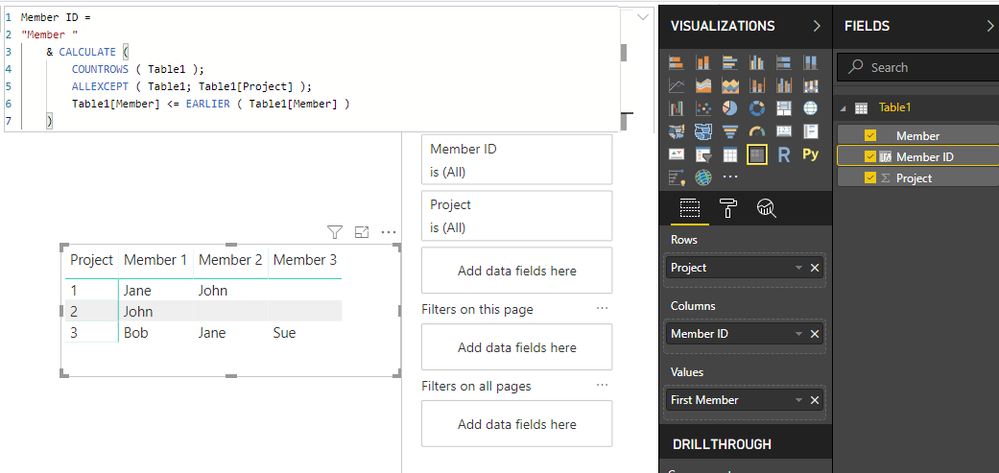
Not sure if the order counts for anything but you can add the following calculated column to your table:

Member ID =
"Member "
    & CALCULATE (
        COUNTROWS ( Table1 );
        ALLEXCEPT ( Table1; Table1[Project] );
        Table1[Member] <= EARLIER ( Table1[Member] )
    )

Then add this to a matrix with this column on Columns:


MemberID.png


Regards,

MFelix


Regards

Miguel Félix


Did I answer your question? Mark my post as a solution!

Proud to be a Super User!

Check out my blog: Power BI em Português


View solution in original post

4 REPLIES 4
Macros
Frequent Visitor

@MFelix 


That's exactly what I was looking for!  I could do it with Excel in roughly the same manner, but I just couldn't figure out how to get DAX to get me the Member Number that I could assign to a column.


Thanks so much for your help!

MFelix
Super User
Super User

Hi @Macros ,


Not sure if the order counts for anything but you can add the following calculated column to your table:

Member ID =
"Member "
    & CALCULATE (
        COUNTROWS ( Table1 );
        ALLEXCEPT ( Table1; Table1[Project] );
        Table1[Member] <= EARLIER ( Table1[Member] )
    )

Then add this to a matrix with this column on Columns:


MemberID.png


Regards,

MFelix


Regards

Miguel Félix


Did I answer your question? Mark my post as a solution!

Proud to be a Super User!

Check out my blog: Power BI em Português


Anonymous
Not applicable

Power Query > Tab Transform > Unpivot Columns

@Anonymous- Thanks for the suggestion, but it doesn't seem to work how I'd like it to look  Still, I really appreciate your time!

Helpful resources

Announcements
New to Fabric survey Carousel

New to Fabric Survey

If you have recently started exploring Fabric, we'd love to hear how it's going. Your feedback can help with product improvements.

Power BI DataViz World Championships carousel

Power BI DataViz World Championships - June 2026

A new Power BI DataViz World Championship is coming this June! Don't miss out on submitting your entry.

March Power BI Update Carousel

Power BI Community Update - March 2026

Check out the March 2026 Power BI update to learn about new features.