Join us at FabCon Atlanta from March 16 - 20, 2026, for the ultimate Fabric, Power BI, AI and SQL community-led event. Save $200 with code FABCOMM.
Register now!The Power BI Data Visualization World Championships is back! Get ahead of the game and start preparing now! Learn more
Looking for a helping hand. I've got a table that looks like this:
Project Member
1 John
1 Jane
2 John
3 Bob
3 Jane
3 Sue
I'd like to display it in Power BI like this:
Project Member 1 Member 2 Member 3
1 John Sue
2 John
3 Bob Jane Sue
I've tried using a Matrix display, but it basically will list out every name that is possible as columns. Just hoping that someone may have an idea of how this could be accomplished. Thanks in advance!
Solved! Go to Solution.
Hi @Macros ,
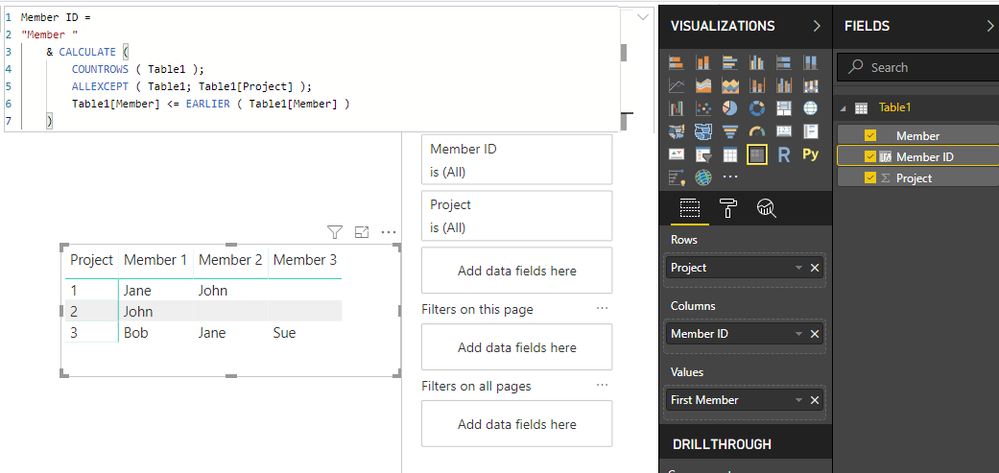
Not sure if the order counts for anything but you can add the following calculated column to your table:
Member ID =
"Member "
& CALCULATE (
COUNTROWS ( Table1 );
ALLEXCEPT ( Table1; Table1[Project] );
Table1[Member] <= EARLIER ( Table1[Member] )
)
Then add this to a matrix with this column on Columns:
Regards,
MFelix
Regards
Miguel Félix
Proud to be a Super User!
Check out my blog: Power BI em Português
That's exactly what I was looking for! I could do it with Excel in roughly the same manner, but I just couldn't figure out how to get DAX to get me the Member Number that I could assign to a column.
Thanks so much for your help!
Hi @Macros ,
Not sure if the order counts for anything but you can add the following calculated column to your table:
Member ID =
"Member "
& CALCULATE (
COUNTROWS ( Table1 );
ALLEXCEPT ( Table1; Table1[Project] );
Table1[Member] <= EARLIER ( Table1[Member] )
)
Then add this to a matrix with this column on Columns:
Regards,
MFelix
Regards
Miguel Félix
Proud to be a Super User!
Check out my blog: Power BI em PortuguêsPower Query > Tab Transform > Unpivot Columns
@Anonymous- Thanks for the suggestion, but it doesn't seem to work how I'd like it to look Still, I really appreciate your time!
The Power BI Data Visualization World Championships is back! Get ahead of the game and start preparing now!
| User | Count |
|---|---|
| 40 | |
| 37 | |
| 33 | |
| 29 | |
| 27 |
| User | Count |
|---|---|
| 133 | |
| 104 | |
| 61 | |
| 59 | |
| 55 |