I would say the easiest method to generate the QR codes is using a free API, for example the one described here:
http://goqr.me/api/
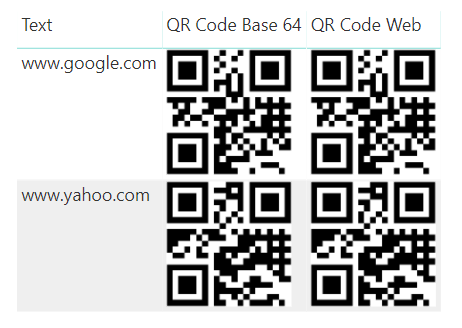
In Power Query, you can either construct the appropriate URL for the API and store in your table, or use the URL to pull in the binary image data from the API and turn it into a Base 64 image URL (using the method described here).
Personally, I prefer Base 64 in this case because the image is stored as static text and doesn't rely on an internet connection when viewing the report.
Then you just need to ensure the Data Category for the column is set to Image URL and the image will display in a table or visual that supports images.
Here's an example pbix created:
Link to QR Code PBIX
Regards,
Owen
Owen AugerDid I answer your question? Mark my post as a solution!BlogLinkedIn


