Don't miss your chance to take exam DP-600 or DP-700 on us!
Request nowLearn from the best! Meet the four finalists headed to the FINALS of the Power BI Dataviz World Championships! Register now
I would say the easiest method to generate the QR codes is using a free API, for example the one described here:
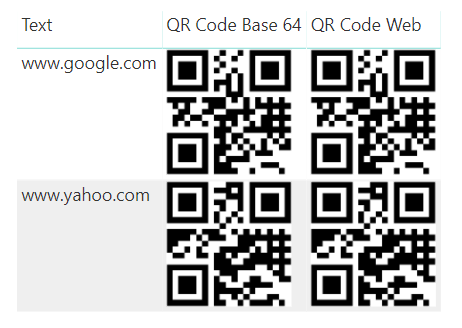
In Power Query, you can either construct the appropriate URL for the API and store in your table, or use the URL to pull in the binary image data from the API and turn it into a Base 64 image URL (using the method described here).
Personally, I prefer Base 64 in this case because the image is stored as static text and doesn't rely on an internet connection when viewing the report.
Then you just need to ensure the Data Category for the column is set to Image URL and the image will display in a table or visual that supports images.
Here's an example pbix created:
Regards,
Owen
Share feedback directly with Fabric product managers, participate in targeted research studies and influence the Fabric roadmap.
Check out the February 2026 Power BI update to learn about new features.
| User | Count |
|---|---|
| 50 | |
| 40 | |
| 37 | |
| 14 | |
| 14 |
| User | Count |
|---|---|
| 85 | |
| 69 | |
| 37 | |
| 28 | |
| 27 |