This is best Fabric, Power BI, SQL and AI community event. How do we know? The last event sold out! Save €200 with code FABCMTY200.
Register nowThe Fabric community is upgrading! Read all of the details including the timeline and what you can expect. Learn more
good morning, I am taking a class online, and the teacher's visualization panel looks different than mine, infact, ever youtube video I watch has the "other visualizaiton"
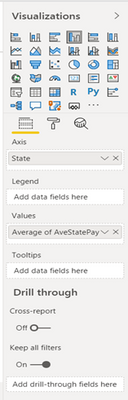
Mine is the one below
How do I get the top visualization, it has different features
Regards
Jill
Solved! Go to Solution.
Hello @bye4now
Both have different versions installed.
The Dark Mode was available on the June 2020 release, released on June 9, 2020.
Hi @bye4now
both pane designs are from different version. The dark pane design was available until June 2019, until than ...
[...] We’ve refreshed much of our interface. We’ve updated all our panes, the footer, and view switcher to be a lighter color, updated spacing, and new icons. Our new look is much more modern and is the first step and refreshing the entire interface.
[...] (https://powerbi.microsoft.com/de-de/blog/power-bi-desktop-june-2019-feature-summary/#panes)
Regards FrankAT
Hello @bye4now
Both have different versions installed.
The Dark Mode was available on the June 2020 release, released on June 9, 2020.
Join us in Barcelona for FabCon and SQLCon, the Fabric, Power BI, SQL, and AI community event. Save €200 with code FABCMTY200.
| User | Count |
|---|---|
| 24 | |
| 22 | |
| 20 | |
| 18 | |
| 14 |
| User | Count |
|---|---|
| 31 | |
| 26 | |
| 23 | |
| 20 | |
| 20 |