Don't miss your chance to take the Fabric Data Engineer (DP-700) exam on us!
Learn moreWe've captured the moments from FabCon & SQLCon that everyone is talking about, and we are bringing them to the community, live and on-demand. Starts on April 14th. Register now
Hi,
I am not sure if this is the default feature on PowerBI or not but I noticed that the design of one of the Visuals on our report is changed.
I am using Tachometer visual and Callout Value peoperty was OFF before but now it is ON.
Also, is there any way to find out what the version of Visual report is using or on Visualizations tab on BI Desktop?
As Tachometer visual is a 3rd party visual, I think you'll get better response from the author(PBISupport@annik.com).
I mean, in general not only 3rd party components, after visual components are updated, will my report use the latest components that are updated? or my report uses original version of components that I used when I designed?
@YDEGUCHI wrote:
I mean, in general not only 3rd party components, after visual components are updated, will my report use the latest components that are updated? or my report uses original version of components that I used when I designed?
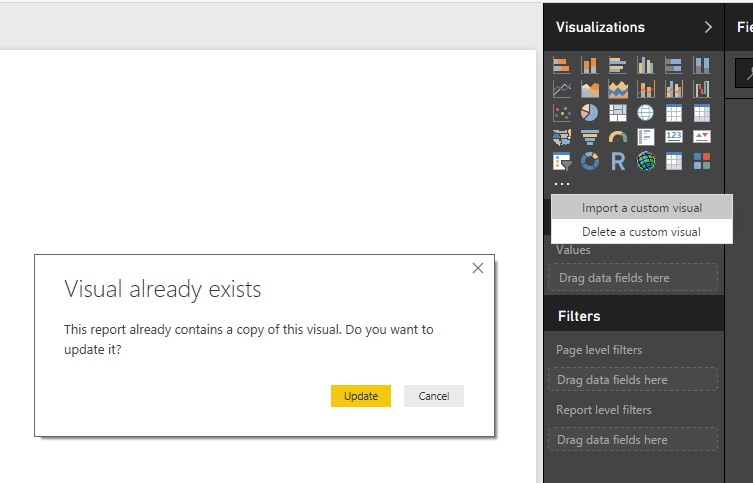
There's no any official documentation talking about the update, but I'd bet that most properly it won't update the already imported custom visual. Because Power BI allow developping custom visuals, you can use the visuals in Power BI without publishing them to the custom visual gallery. Then for the ones not published, from where does Power BI update them?
To update the custom visuals, you can try to import the new version visuals.
If you have recently started exploring Fabric, we'd love to hear how it's going. Your feedback can help with product improvements.
A new Power BI DataViz World Championship is coming this June! Don't miss out on submitting your entry.
Share feedback directly with Fabric product managers, participate in targeted research studies and influence the Fabric roadmap.
| User | Count |
|---|---|
| 53 | |
| 37 | |
| 35 | |
| 19 | |
| 17 |
| User | Count |
|---|---|
| 74 | |
| 72 | |
| 39 | |
| 35 | |
| 23 |