This time we’re going bigger than ever. Fabric, Power BI, SQL, AI and more. We're covering it all. You won't want to miss it.
Learn moreDid you hear? There's a new SQL AI Developer certification (DP-800). Start preparing now and be one of the first to get certified. Register now
Anyone knows if there is any visualization that can create a bar chart with an x-axis like this?
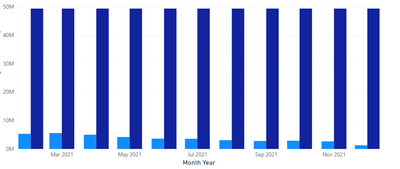
When I try to drag the 2 columns, 1 does not have date so I just want a total column for it, then I drag another column which can be displayed across months like this.
Target Value Jan Feb Mar Apr May .... Dec
This is how it looks right now, I only want a the dark blue column as a singular column instead of being repeated for every month
Solved! Go to Solution.
Hi @kitala11 ,
First create a column as below:
Total = IF('Table'[Date]=MAXX(ALL('Table'),'Table'[Date]),SUM('Table'[Value]),BLANK())
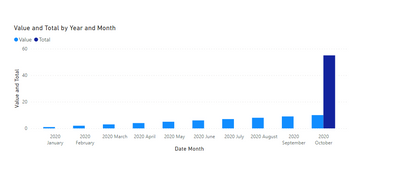
And you will see:
For the related .pbix file,pls see attached.
Best Regards,
Kelly
Did I answer your question? Mark my post as a solution!
Hi @kitala11 ,
First create a column as below:
Total = IF('Table'[Date]=MAXX(ALL('Table'),'Table'[Date]),SUM('Table'[Value]),BLANK())
And you will see:
For the related .pbix file,pls see attached.
Best Regards,
Kelly
Did I answer your question? Mark my post as a solution!
@kitala11 , In that case, you need add a date in the target table like Year start or year and join that with Date table
You can check this video for date in target table https://www.youtube.com/watch?v=yPQ9UV37LOU
Check out the April 2026 Power BI update to learn about new features.
Sign up to receive a private message when registration opens and key events begin.
If you have recently started exploring Fabric, we'd love to hear how it's going. Your feedback can help with product improvements.
| User | Count |
|---|---|
| 35 | |
| 32 | |
| 27 | |
| 23 | |
| 16 |
| User | Count |
|---|---|
| 65 | |
| 50 | |
| 30 | |
| 25 | |
| 24 |