cancel
Showing results for 
Search instead for 
Did you mean: 

Learn from the best! Meet the four finalists headed to the FINALS of the Power BI Dataviz World Championships! Register now

Reply
kitala11
Helper III
Helper III

Visualization Help

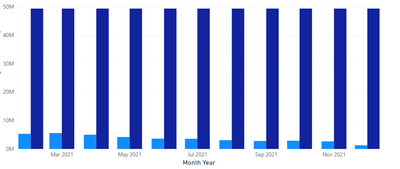
Anyone knows if there is any visualization that can create a bar chart with an x-axis like this?

When I try to drag the 2 columns, 1 does not have date so I just want a total column for it, then I drag another column which can be displayed across months like this. 


Target Value    Jan Feb Mar Apr May .... Dec


This is how it looks right now, I only want a the dark blue column as a singular column instead of being repeated for every month


kitala11_2-1612755150798.png


1 ACCEPTED SOLUTION
v-kelly-msft
Community Support
Community Support

Hi  @kitala11 ,


First create a column as below:

Total = IF('Table'[Date]=MAXX(ALL('Table'),'Table'[Date]),SUM('Table'[Value]),BLANK())

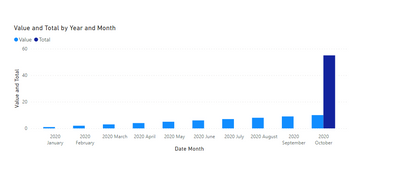
And you will see:

v-kelly-msft_0-1613037093329.png


For the related .pbix file,pls see attached.


Best Regards,
Kelly

Did I answer your question? Mark my post as a solution!


View solution in original post

2 REPLIES 2
v-kelly-msft
Community Support
Community Support

Hi  @kitala11 ,


First create a column as below:

Total = IF('Table'[Date]=MAXX(ALL('Table'),'Table'[Date]),SUM('Table'[Value]),BLANK())

And you will see:

v-kelly-msft_0-1613037093329.png


For the related .pbix file,pls see attached.


Best Regards,
Kelly

Did I answer your question? Mark my post as a solution!


amitchandak
Super User
Super User

@kitala11 , In that case, you need add a date in the target table like Year start or year and join that with Date table


You can check this video for date in target table https://www.youtube.com/watch?v=yPQ9UV37LOU

Share with Power BI Enthusiasts: Full Power BI Video (20 Hours) YouTube
Microsoft Fabric Series 60+ Videos YouTube
Microsoft Fabric Hindi End to End YouTube

Helpful resources

Announcements
Join our Fabric User Panel

Join our Fabric User Panel

Share feedback directly with Fabric product managers, participate in targeted research studies and influence the Fabric roadmap.

February Power BI Update Carousel

Power BI Monthly Update - February 2026

Check out the February 2026 Power BI update to learn about new features.

FabCon Atlanta 2026 carousel

FabCon Atlanta 2026

Join us at FabCon Atlanta, March 16-20, for the ultimate Fabric, Power BI, AI and SQL community-led event. Save $200 with code FABCOMM.