
Join us at FabCon Atlanta from March 16 - 20, 2026, for the ultimate Fabric, Power BI, AI and SQL community-led event. Save $200 with code FABCOMM.
Register now!Vote for your favorite vizzies from the Power BI Dataviz World Championship submissions. Vote now!
Hi,
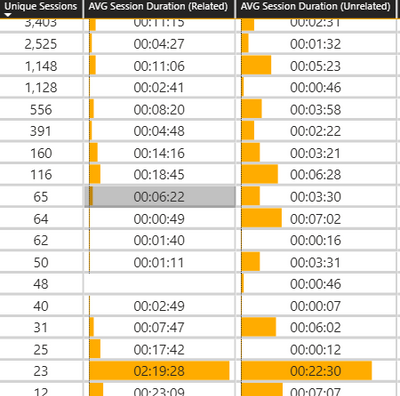
I have two columns in the table with duration time.
Current Data Bars length is according to min and max value in their column.
In such a situation it is not possible to visually compare two columns, because the maximum and minimum values in each column are different. (A 2 hours and 20-minute bar look the same.)
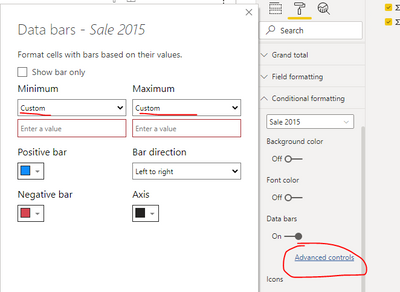
In the settings you can adjust the size of the bar according to the minimum and maximum in the same column and not according to two columns ...
Does anyone know a better way to present a visual comparison between two columns?
@Anonymous this is also a matrix visual which you are using in your file. You can make it look better by formatting the matrix table and using proper color comibnation. It is upto us to take our dashboard/visual to the next level.
Proud to be a Super User!
Hi @Anonymous ,
You can find custom minmum value and maximum vlaue in "Advanced controls".
Best regards,
Lionel Chen
If this post helps, then please consider Accept it as the solution to help the other members find it more quickly.
@v-lionel-msft
This for manual entry, but I need dynamically min and max values by two columns.
@Anonymous in matrix visual for comparision purpose data bar are used. in this case you can set the min and max value same for both the columns. Below is an example of the bar chart use in matrix visual
Proud to be a Super User!
Vote for your favorite vizzies from the Power BI World Championship submissions!
If you love stickers, then you will definitely want to check out our Community Sticker Challenge!
Check out the January 2026 Power BI update to learn about new features.
| User | Count |
|---|---|
| 63 | |
| 51 | |
| 41 | |
| 23 | |
| 18 |
| User | Count |
|---|---|
| 134 | |
| 111 | |
| 50 | |
| 31 | |
| 29 |