Don't miss your chance to take the Fabric Data Engineer (DP-600) exam for FREE! Find out how by watching the DP-600 session on-demand now through April 28th.
Learn moreJoin the FabCon + SQLCon recap series. Up next: Power BI, Real-Time Intelligence, IQ and AI, and Data Factory take center stage. All sessions are available on-demand after the live show. Register now
I have created a table visual to show a list of items that do not have a valid status. I have a list of valid statuses (A, D, N, S, O, and more) and want to show any item with anything other than the valid ones. On the visual advanced filtering, I can only have 2 (status is not A or status is not D).
Any help would be appreciated!
Solved! Go to Solution.
Hi @Anonymous,
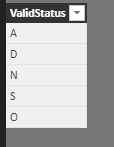
You need an extra table (suppose it's 'ValidStatus') to list all valid statuses.
Create such a measure:
Measure =
IF (
ISERROR (
FIND (
SELECTEDVALUE ( DataTable[Status] ),
CONCATENATEX ( ValidStatus, ValidStatus[ValidStatus], "," )
)
),
0,
1
)
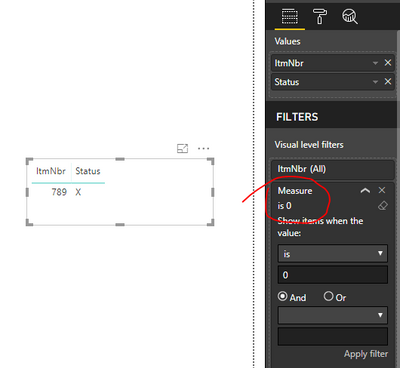
Add this measure to visual level filters and set its value to 1.
Best regards,
Yuliana Gu
Hi @Anonymous,
You need an extra table (suppose it's 'ValidStatus') to list all valid statuses.
Create such a measure:
Measure =
IF (
ISERROR (
FIND (
SELECTEDVALUE ( DataTable[Status] ),
CONCATENATEX ( ValidStatus, ValidStatus[ValidStatus], "," )
)
),
0,
1
)
Add this measure to visual level filters and set its value to 1.
Best regards,
Yuliana Gu
Thanks Yuliana. I decided to create an additional column with a switch statement for each valid value and setting to 1 if valid or 0 if not. Then I could key off this column for my visual.
@Anonymous Any sample data and expected output will be helpful.
Proud to be a PBI Community Champion
Thank you for replying quickly.
Here's a sample of my data:
ItmNbr Status
123 A
456 D
789 X
Both A & D are valid statues. I would like to show in my report:
ItmNbr Status
789 X
There is currently no table with valid status. Would it be beneficial to make one?
Check out the April 2026 Power BI update to learn about new features.
If you have recently started exploring Fabric, we'd love to hear how it's going. Your feedback can help with product improvements.
A new Power BI DataViz World Championship is coming this June! Don't miss out on submitting your entry.
| User | Count |
|---|---|
| 43 | |
| 38 | |
| 35 | |
| 21 | |
| 15 |
| User | Count |
|---|---|
| 65 | |
| 58 | |
| 28 | |
| 27 | |
| 25 |