Join us at FabCon Atlanta from March 16 - 20, 2026, for the ultimate Fabric, Power BI, AI and SQL community-led event. Save $200 with code FABCOMM.
Register now!The Power BI Data Visualization World Championships is back! Get ahead of the game and start preparing now! Learn more
Morning experts,
I've got a report which holds totals by month. I've got a data card which shows a specific total, and the user can select either the year to date, or a specific month using a report level slicer and the data card changes accordingly.
I want a new measure which finds the previous month's total, and subtracts this from the current month total to see the difference. I can then use conditional formatting to colour the number whther it's a good or bad change.
To add a complication, I am excluding the number 555 from my measure, as this indicates a 'not applicable' in the column.
I have a formula, which is not working in the slightest:
MY MEASURE = CALCULATE(SUM(Database[TOTAL),Database[TOTAL]<>555)-
CALCULATE(SUM(Database[TOTAL]),PREVIOUSMONTH(CalendarYear[Date]),Database[TOTAL]<>555)
Any suggestions would be happily tried! 🙂
Solved! Go to Solution.
So as I didn't get a response on here I managed to find out that I had to create a measure that calculates the previous month first.
I did this using :
Previous Month Total = CALCULATE(SUM(Database[total]),PREVIOUSMONTH(Database[Date].[Date]))
I then simply created a second measure which subtracted the Database[Previous Month Total] from the Database[Total]. Job done!
@Anonymous Please provide the sample data which will be really helpful to solve your issue quicker.
Proud to be a PBI Community Champion
Hi there,
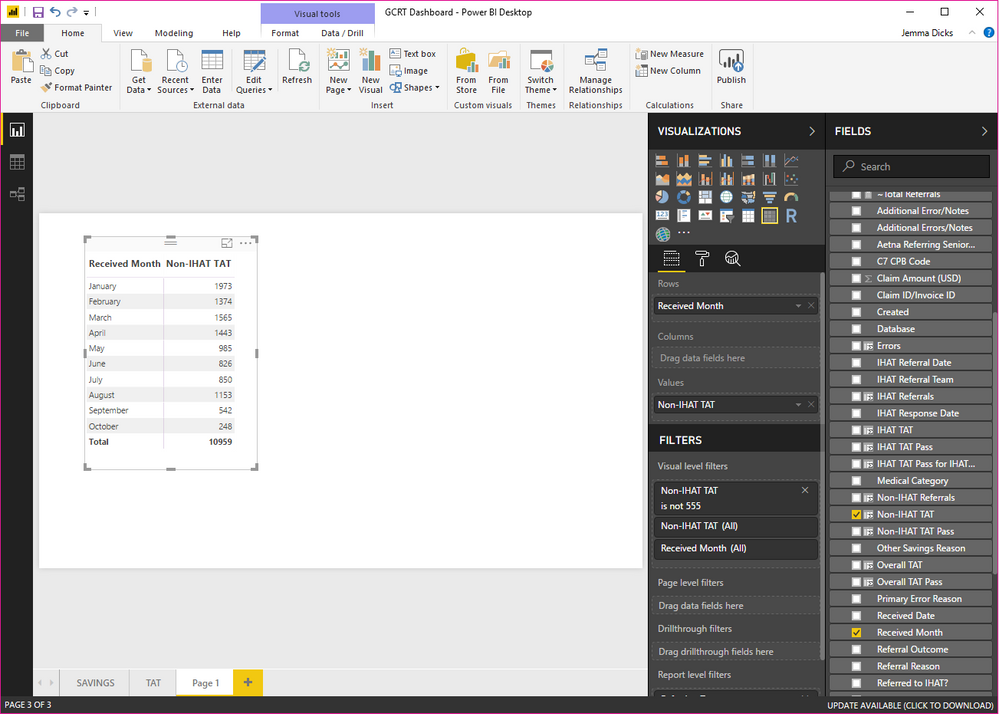
Here is a screenshot which shows the data I have - the totals by month and how i've removed the '555' within the visual filter.
What I want now is a measure that basically does February less January (so 1374-1973), excluding any '555'.
Screenshot of PBI Desktop
So as I didn't get a response on here I managed to find out that I had to create a measure that calculates the previous month first.
I did this using :
Previous Month Total = CALCULATE(SUM(Database[total]),PREVIOUSMONTH(Database[Date].[Date]))
I then simply created a second measure which subtracted the Database[Previous Month Total] from the Database[Total]. Job done!
The Power BI Data Visualization World Championships is back! Get ahead of the game and start preparing now!
| User | Count |
|---|---|
| 38 | |
| 36 | |
| 33 | |
| 31 | |
| 28 |
| User | Count |
|---|---|
| 129 | |
| 88 | |
| 79 | |
| 68 | |
| 63 |