Join us at FabCon Atlanta from March 16 - 20, 2026, for the ultimate Fabric, Power BI, AI and SQL community-led event. Save $200 with code FABCOMM.
Register now!The Power BI Data Visualization World Championships is back! Get ahead of the game and start preparing now! Learn more
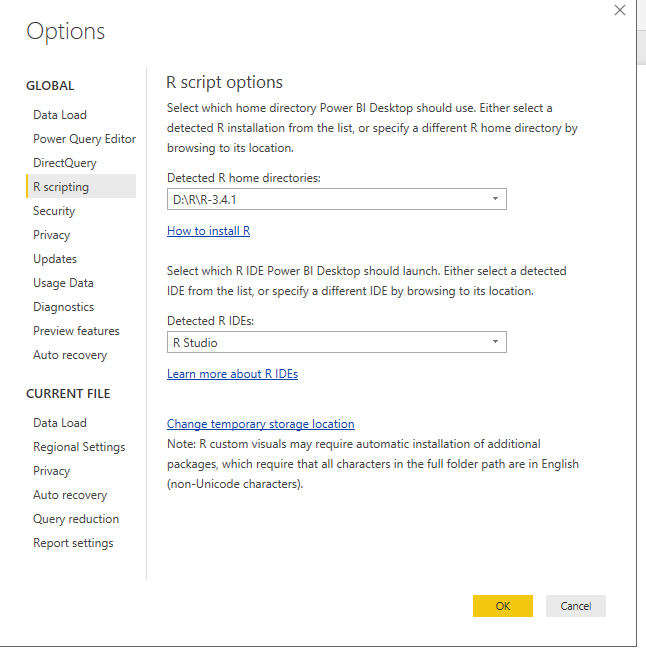
When I try to set up Visual Studio 2017 with R Tools in Power BI Desktop, the R home directory is not detected automatically and I don't know how to choose my "preferred R home directory", or how to find my preferred R IDE (also not detected automatically.) When I try to browse to the C drive to drill down, it is not an option. When I set up a network drive, it tells me the path wasn't identified as a a valid R home Directory. How do I set up a "valid R home directory"? I work on a thin client with Citrix. Is that the problem, and if so, is there anything I can do about it?
HI @mdaitsman,
Please take a look at following link to know how to setting R home folder and IDE:
Use an external R IDE with Power BI
After configure if it still not available, I think you need to change other library and IDE.(it test to configure R script and R studio works)
Regards,
Xiaoxin Sheng
SAME
The Power BI Data Visualization World Championships is back! Get ahead of the game and start preparing now!
| User | Count |
|---|---|
| 41 | |
| 38 | |
| 36 | |
| 31 | |
| 28 |
| User | Count |
|---|---|
| 129 | |
| 88 | |
| 79 | |
| 68 | |
| 63 |