Join us at FabCon Atlanta from March 16 - 20, 2026, for the ultimate Fabric, Power BI, AI and SQL community-led event. Save $200 with code FABCOMM.
Register now!The Power BI Data Visualization World Championships is back! It's time to submit your entry. Live now!
Hello - I am working in Power BI desktop and have an issue with the visual header icons in the report. I have disabled and enabled but the icons still aren't showing up. You'll see below that the icon is enabled but they're still not showing up. I'm expecting to see the pin and the drill-down/drill-up icons.
I have checked the report settings and explored possible settings but theyre still not showing up.
Could some provide me with some help? I am very stuck but need this funcationality ASAP. Thanks in advance.
Reed
Solved! Go to Solution.
No problem. Don't forget to click the 'Accept as Solution' button to close this off.
| Have I solved your problem? Please click Accept as Solution so I don't keep coming back to this post, oh yeah, others may find it useful also ;). |
KNP - thank you so much for the quick reply!
I was forgetting about the drilling levels so thanks for that.
I see the pin functionality in Service but I thought I could also have it in Desktop. We're working on setting up email notifications and I was thinking I had seen the pin in desktop.
Thanks again.
No problem. Don't forget to click the 'Accept as Solution' button to close this off.
| Have I solved your problem? Please click Accept as Solution so I don't keep coming back to this post, oh yeah, others may find it useful also ;). |
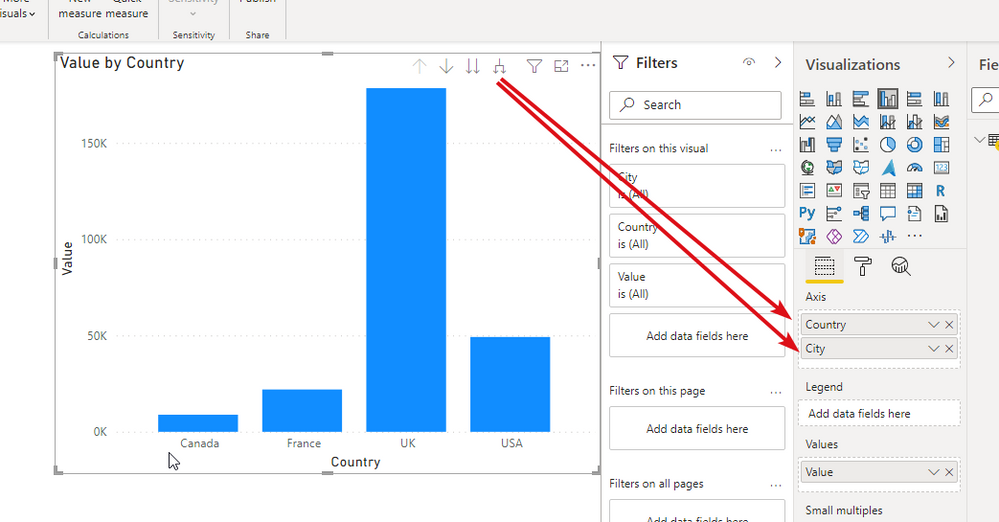
The drill up/down will only show up if there are multiple levels in the visual.
The pin icon will only show once published to the service.
Are you referring to Desktop or the published report in the Service?
| Have I solved your problem? Please click Accept as Solution so I don't keep coming back to this post, oh yeah, others may find it useful also ;). |
The Power BI Data Visualization World Championships is back! It's time to submit your entry.
Check out the January 2026 Power BI update to learn about new features.
| User | Count |
|---|---|
| 56 | |
| 42 | |
| 41 | |
| 21 | |
| 21 |
| User | Count |
|---|---|
| 150 | |
| 107 | |
| 64 | |
| 36 | |
| 36 |