Get certified for free when you join Fabric Data Days 2026 and dive into Fabric, Power BI, SQL, AI, and other essential data skills.
Join nowData Days is here! Join us now for 60+ days of learning, challenges, and connection. Learn more
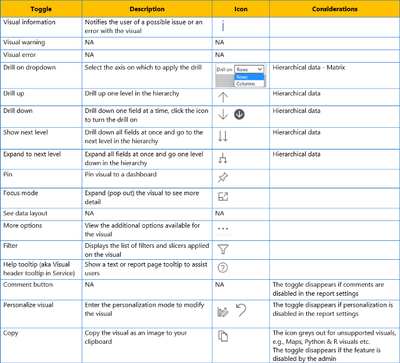
Does anyone know what these 3 options in the Visual Header Format Menu actually do?
1) Visual warning icon
2) Visual error icon
3) See data layout icon
If anyone knows please post pictures to show what actually changes when on versus when off?
Thanks! ![]()
Hi,
I didn't find any official MS documentation about visual headers... crazy! Right ?!
For the 3 options you're talking about in your original post, they seem to do NOTHING.
This article is the best I found so far.... and they arrive at the same conclusion.
Visual Header Icons in Power BI. A complete guide to mastering visual… | by Dhyanendra Singh Rathore...
--mo
Hello
After researching and testing, I haven't found any changes on those icons.
Here are some articles which discuss about visual header, hope they can provide some ideas for you.
https://powerbi.microsoft.com/en-us/blog/tag/visual-header/
https://www.wiseowl.co.uk/blog/s2611/visual-headers.htm
Best Regards
Maggie
I was hoping someone from the PBI team can shed some light on this.
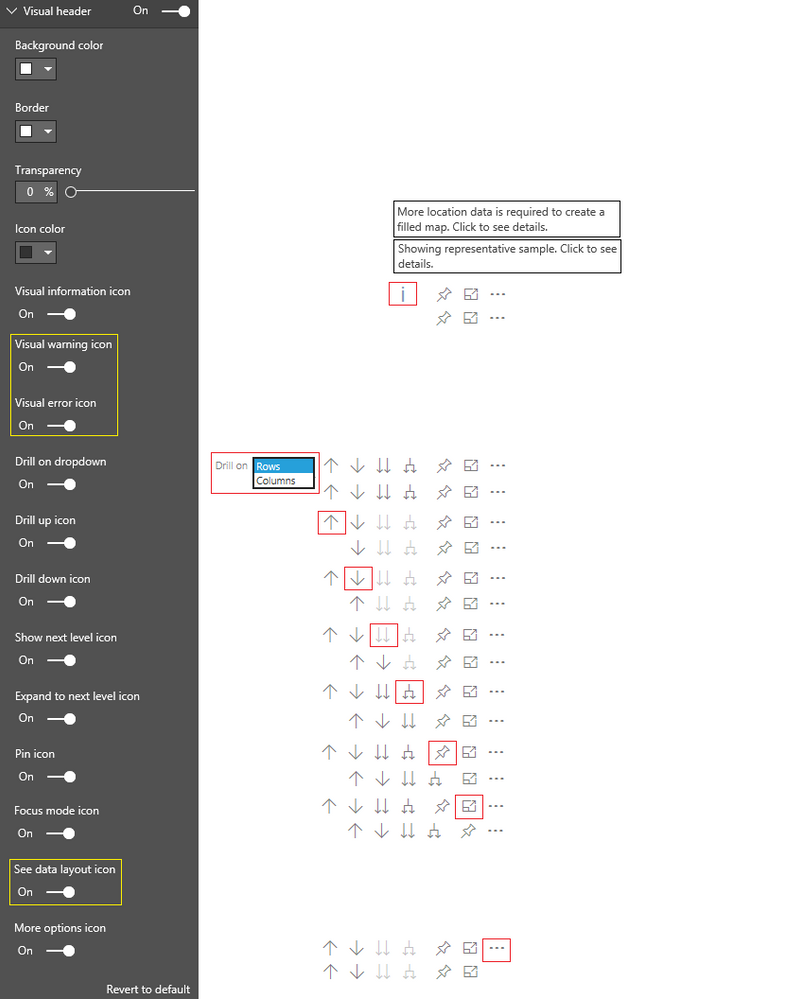
My image below shows what happens for each option when icon is on and when off (except for the 3 in yellow)
I've included 2 examples of what the Information Icon my say... (The drill down dropdown icon is from Matrix)
Thank you for the links but unfortunetely they don't address my question.
I had already submitted an Issue (unrelated to this) about the Visual Header which was accepted.
Thanks! ![]()
Greate pictur Sean, thx for this.
Don't miss out on Data Days, June 15 through August 7. Learn Fabric, Power BI, SQL, AI and more.
Check out the May 2026 Power BI update to learn about new features.
| User | Count |
|---|---|
| 23 | |
| 23 | |
| 21 | |
| 20 | |
| 15 |
| User | Count |
|---|---|
| 58 | |
| 53 | |
| 42 | |
| 30 | |
| 24 |