Join us in Barcelona for FabCon and SQLCon, September 28 - October 1, 2026.
This is best Fabric, Power BI, SQL and AI community event. How do we know? The last event sold out! Save €200 with code FABCMTY200.
Register now- Power BI forums
- Get Help with Power BI
- Desktop
- Service
- Report Server
- Power Query
- Mobile Apps
- Developer
- DAX Commands and Tips
- Custom Visuals Development Discussion
- Health and Life Sciences
- Power BI Spanish forums
- Translated Spanish Desktop
- Training and Consulting
- Instructor Led Training
- Dashboard in a Day for Women, by Women
- Galleries
- Data Stories Gallery
- Themes Gallery
- Contests Gallery
- QuickViz Gallery
- Quick Measures Gallery
- Visual Calculations Gallery
- Fabric Apps Gallery
- Notebook Gallery
- Translytical Task Flow Gallery
- TMDL Gallery
- R Script Showcase
- Webinars and Video Gallery
- Ideas
- Custom Visuals Ideas (read-only)
- Issues
- Issues
- Events
- Upcoming Events
The Fabric community is now in read-only for platform upgrade. Learn more
- Power BI forums
- Forums
- Get Help with Power BI
- Desktop
- Virtual Table inside Measure - strange behaviour
- Subscribe to RSS Feed
- Mark Topic as New
- Mark Topic as Read
- Float this Topic for Current User
- Bookmark
- Subscribe
- Printer Friendly Page


- Mark as New
- Bookmark
- Subscribe
- Mute
- Subscribe to RSS Feed
- Permalink
- Report Inappropriate Content
Virtual Table inside Measure - strange behaviour
Hi, guys,
I got stuck on one issue and I can't figure out why it works like that. I mean I have an idea, but it is still strange.
I have this sample data:
FlightDate|Number|DepartureTime
| 05.05.2022 | 123 | 05:05:59 |
| 04.05.2022 | 123 | 07:05:59 |
| 06.03.2022 | 56 | 07:05:59 |
| 09.02.2022 | 58 | 07:05:59 |
| 10.02.2022 | 456 | 07:05:59 |
| 01.01.2022 | 1232 | 07:03:59 |
| 01.01.2022 | 1232 | 07:05:59 |
I am trying to figure out if I have [Number] more than one time in my table and If so, evaluate whether it has the same [FlightDate] if not then return False.
I have an idea how to do it but I got stuck on some strange behaviour of the virtual table.
This is my table visual with the current Measure:
TestForDateTable =
    var currentNumber = MAX(Flights[Number])
    var sameFlightDate = ADDCOLUMNS(SUMMARIZE(Flights, Flights[Number], Flights[FlightDate], "CountOfDuplicates", COUNTROWS(Flights)),"UniqueNumber", Flights[Number])
    var summrazizeNumbes = ADDCOLUMNS(SUMMARIZE(Flights, Flights[Number], "CountOfNumbers", COUNTROWS(Flights)), "UniqueNumber", Flights[Number])

    var MatchNumbers = MAXX(FILTER(sameFlightDate, currentNumber = [UniqueNumber]), [CountOfDuplicates])
    var MatchFlightDate = MAXX(FILTER(sameFlightDate, MatchNumbers = [UniqueNumber]), [CountOfDuplicates])


    return MatchNumbers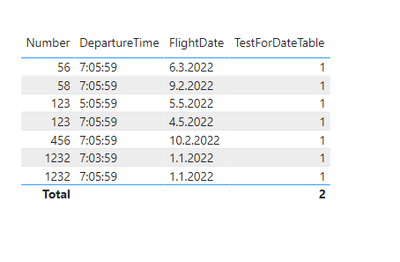
This is what the Virtual Table looks like physically:
So basically what I want to do is to take the Current Number filter inside the Virtual Table and assign the proper Count and then display it, however it somehow Displays always 1 instead of 2 when it should be 2. It works when I remove all other columns from my Table Visual but it has to work regardless of the Column I put into the Visual, right?
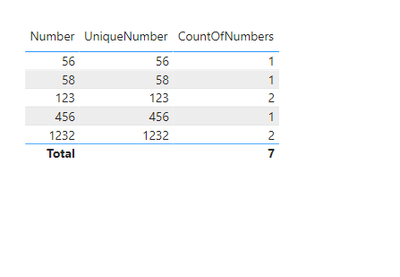
Could someone please advise what I do wrong and which filter context should I use to eliminate the context it'S getting? I already tried to use ALL and the whole ALL family but it doesn't change the outcome.
Thank you
Solved! Go to Solution.

- Mark as New
- Bookmark
- Subscribe
- Mute
- Subscribe to RSS Feed
- Permalink
- Report Inappropriate Content
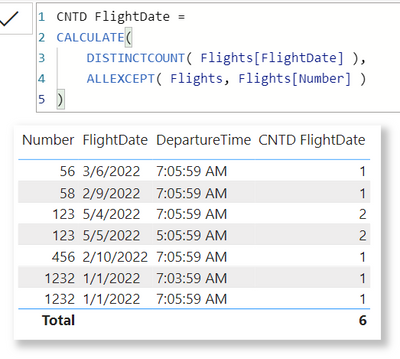
You can use
Num Different Flights =
var currentNumber = SELECTEDVALUE(Flights[Number])
var summaryTable = CALCULATETABLE( SUMMARIZE( Flights, Flights[FlightDate]), REMOVEFIlTERS(Flights), Flights[Number] = currentNumber)
return COUNTROWS( summaryTable )

- Mark as New
- Bookmark
- Subscribe
- Mute
- Subscribe to RSS Feed
- Permalink
- Report Inappropriate Content
I don't see any necessity of complexity according to your description in case of such a simple question.
| Thanks to the great efforts by MS engineers to simplify syntax of DAX! Most beginners are SUCCESSFULLY MISLED to think that they could easily master DAX; but it turns out that the intricacy of the most frequently used RANKX() is still way beyond their comprehension! |
DAX is simple, but NOT EASY! |
- Mark as New
- Bookmark
- Subscribe
- Mute
- Subscribe to RSS Feed
- Permalink
- Report Inappropriate Content
I don't see any necessity of complexity according to your description in case of such a simple question.
| Thanks to the great efforts by MS engineers to simplify syntax of DAX! Most beginners are SUCCESSFULLY MISLED to think that they could easily master DAX; but it turns out that the intricacy of the most frequently used RANKX() is still way beyond their comprehension! |
DAX is simple, but NOT EASY! |
- Mark as New
- Bookmark
- Subscribe
- Mute
- Subscribe to RSS Feed
- Permalink
- Report Inappropriate Content
- Mark as New
- Bookmark
- Subscribe
- Mute
- Subscribe to RSS Feed
- Permalink
- Report Inappropriate Content
You can use
Num Different Flights =
var currentNumber = SELECTEDVALUE(Flights[Number])
var summaryTable = CALCULATETABLE( SUMMARIZE( Flights, Flights[FlightDate]), REMOVEFIlTERS(Flights), Flights[Number] = currentNumber)
return COUNTROWS( summaryTable )- Mark as New
- Bookmark
- Subscribe
- Mute
- Subscribe to RSS Feed
- Permalink
- Report Inappropriate Content

Helpful resources

FabCon & SQLCon – Barcelona 2026
Join us in Barcelona for FabCon and SQLCon, the Fabric, Power BI, SQL, and AI community event. Save €200 with code FABCMTY200.

Power BI DataViz World Championships - June 2026
A new Power BI DataViz World Championship is coming this June! Don't miss out on submitting your entry.

| User | Count |
|---|---|
| 23 | |
| 22 | |
| 14 | |
| 14 | |
| 13 |


| User | Count |
|---|---|
| 47 | |
| 39 | |
| 24 | |
| 20 | |
| 20 |


