Get Fabric or SQL Certified for Free.
Get certified for free when you join Fabric Data Days 2026 and dive into Fabric, Power BI, SQL, AI, and other essential data skills.
Join now- Power BI forums
- Get Help with Power BI
- Desktop
- Service
- Report Server
- Power Query
- Mobile Apps
- Developer
- DAX Commands and Tips
- Custom Visuals Development Discussion
- Health and Life Sciences
- Power BI Spanish forums
- Translated Spanish Desktop
- Training and Consulting
- Instructor Led Training
- Dashboard in a Day for Women, by Women
- Galleries
- Data Stories Gallery
- Themes Gallery
- Contests Gallery
- QuickViz Gallery
- Quick Measures Gallery
- Visual Calculations Gallery
- Notebook Gallery
- Translytical Task Flow Gallery
- TMDL Gallery
- R Script Showcase
- Webinars and Video Gallery
- Ideas
- Custom Visuals Ideas (read-only)
- Issues
- Issues
- Events
- Upcoming Events
Try your skills in the Power BI Dataviz World Championship! Round one ends June 26. Join now
- Power BI forums
- Forums
- Get Help with Power BI
- Desktop
- Re: Virtual Table inside Measure - strange behavio...
- Subscribe to RSS Feed
- Mark Topic as New
- Mark Topic as Read
- Float this Topic for Current User
- Bookmark
- Subscribe
- Printer Friendly Page


- Mark as New
- Bookmark
- Subscribe
- Mute
- Subscribe to RSS Feed
- Permalink
- Report Inappropriate Content
Virtual Table inside Measure - strange behaviour
Hi, guys,
I got stuck on one issue and I can't figure out why it works like that. I mean I have an idea, but it is still strange.
I have this sample data:
FlightDate|Number|DepartureTime
| 05.05.2022 | 123 | 05:05:59 |
| 04.05.2022 | 123 | 07:05:59 |
| 06.03.2022 | 56 | 07:05:59 |
| 09.02.2022 | 58 | 07:05:59 |
| 10.02.2022 | 456 | 07:05:59 |
| 01.01.2022 | 1232 | 07:03:59 |
| 01.01.2022 | 1232 | 07:05:59 |
I am trying to figure out if I have [Number] more than one time in my table and If so, evaluate whether it has the same [FlightDate] if not then return False.
I have an idea how to do it but I got stuck on some strange behaviour of the virtual table.
This is my table visual with the current Measure:
TestForDateTable =
    var currentNumber = MAX(Flights[Number])
    var sameFlightDate = ADDCOLUMNS(SUMMARIZE(Flights, Flights[Number], Flights[FlightDate], "CountOfDuplicates", COUNTROWS(Flights)),"UniqueNumber", Flights[Number])
    var summrazizeNumbes = ADDCOLUMNS(SUMMARIZE(Flights, Flights[Number], "CountOfNumbers", COUNTROWS(Flights)), "UniqueNumber", Flights[Number])

    var MatchNumbers = MAXX(FILTER(sameFlightDate, currentNumber = [UniqueNumber]), [CountOfDuplicates])
    var MatchFlightDate = MAXX(FILTER(sameFlightDate, MatchNumbers = [UniqueNumber]), [CountOfDuplicates])


    return MatchNumbers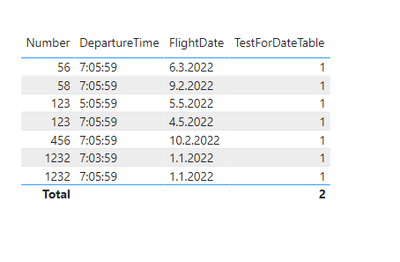
This is what the Virtual Table looks like physically:
So basically what I want to do is to take the Current Number filter inside the Virtual Table and assign the proper Count and then display it, however it somehow Displays always 1 instead of 2 when it should be 2. It works when I remove all other columns from my Table Visual but it has to work regardless of the Column I put into the Visual, right?
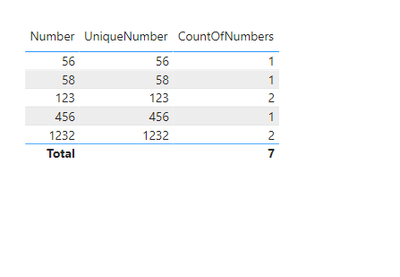
Could someone please advise what I do wrong and which filter context should I use to eliminate the context it'S getting? I already tried to use ALL and the whole ALL family but it doesn't change the outcome.
Thank you
Solved! Go to Solution.

- Mark as New
- Bookmark
- Subscribe
- Mute
- Subscribe to RSS Feed
- Permalink
- Report Inappropriate Content
You can use
Num Different Flights =
var currentNumber = SELECTEDVALUE(Flights[Number])
var summaryTable = CALCULATETABLE( SUMMARIZE( Flights, Flights[FlightDate]), REMOVEFIlTERS(Flights), Flights[Number] = currentNumber)
return COUNTROWS( summaryTable )

- Mark as New
- Bookmark
- Subscribe
- Mute
- Subscribe to RSS Feed
- Permalink
- Report Inappropriate Content
I don't see any necessity of complexity according to your description in case of such a simple question.
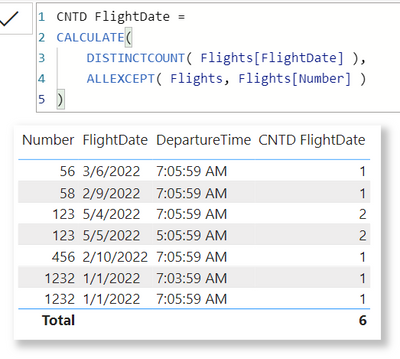
| Thanks to the great efforts by MS engineers to simplify syntax of DAX! Most beginners are SUCCESSFULLY MISLED to think that they could easily master DAX; but it turns out that the intricacy of the most frequently used RANKX() is still way beyond their comprehension! |
DAX is simple, but NOT EASY! |
- Mark as New
- Bookmark
- Subscribe
- Mute
- Subscribe to RSS Feed
- Permalink
- Report Inappropriate Content
I don't see any necessity of complexity according to your description in case of such a simple question.
| Thanks to the great efforts by MS engineers to simplify syntax of DAX! Most beginners are SUCCESSFULLY MISLED to think that they could easily master DAX; but it turns out that the intricacy of the most frequently used RANKX() is still way beyond their comprehension! |
DAX is simple, but NOT EASY! |
- Mark as New
- Bookmark
- Subscribe
- Mute
- Subscribe to RSS Feed
- Permalink
- Report Inappropriate Content
- Mark as New
- Bookmark
- Subscribe
- Mute
- Subscribe to RSS Feed
- Permalink
- Report Inappropriate Content
You can use
Num Different Flights =
var currentNumber = SELECTEDVALUE(Flights[Number])
var summaryTable = CALCULATETABLE( SUMMARIZE( Flights, Flights[FlightDate]), REMOVEFIlTERS(Flights), Flights[Number] = currentNumber)
return COUNTROWS( summaryTable )- Mark as New
- Bookmark
- Subscribe
- Mute
- Subscribe to RSS Feed
- Permalink
- Report Inappropriate Content

Helpful resources

Data Days 2026
Don't miss out on Data Days, June 15 through August 7. Learn Fabric, Power BI, SQL, AI and more.

Power BI DataViz World Championships - June 2026
A new Power BI DataViz World Championship is coming this June! Don't miss out on submitting your entry.

| User | Count |
|---|---|
| 24 | |
| 22 | |
| 22 | |
| 21 | |
| 13 |


| User | Count |
|---|---|
| 66 | |
| 56 | |
| 45 | |
| 44 | |
| 30 |


